• Skip to main content
  • Skip to primary sidebar

Galaxy S8 Guides

A Community for owners of Galaxy S8 and Galaxy S8+

  • Home
    • About
    • Contact Us
  • New features
    • How to use the new features in Android Pie update for Galaxy S8 and S8+?
    • How to disable Bixby button in Galaxy S8 and Galaxy S8+?
      • How to remove Bixby Home page in Galaxy S8 and S8+ home screen?
    • How to use Secure Folder on Galaxy S8, S9, S10, and S20?
    • How to customize Galaxy S8 navigation buttons and navigation bar?
      • How to show and hide Galaxy S8 navigation bar?
    • How to set up and use Galaxy S8 iris scanner to unlock Galaxy S8 and S8+?
    • Top 10 new features of Samsung Galaxy S8 and S8+
      • Top 10 new features of Android Oreo update for Galaxy S8 and S8+
      • Top 8 missing features of Galaxy S8 and S8+ that may annoy you
      • Samsung Galaxy S8 specs and Galaxy S8+ specs
    • How to use Galaxy S8 apps screen, and how to hide and show apps screen button in Galaxy S8 and S8+?
    • How to use Galaxy S8 floating camera button in Galaxy S8 and S8+?
    • How to use context menu in Galaxy S8 Home screen?
  • How-to guides
    • How to use the new features in Android Pie update for Galaxy S8 and S8+?
    • Galaxy S8 Android Oreo update guides
      • Top 10 new features of Android Oreo update for Galaxy S8 and S8+
      • New status icons in Android Oreo update for Galaxy S8 and S8+
      • Use notification dots/notification number badge in Galaxy S8 Android Oreo update
      • How to use app shortcuts in Galaxy S8 Home screen in Android Oreo update for Galaxy S8 and S8+?
      • How to Install Galaxy S8 Android Oreo Update for Galaxy S8 and S8+?
    • Meaning of Galaxy S8 status icons and notification icons in Samsung Galaxy S8 and S8+
      • How to use and customize Galaxy S8 lock screen?
      • Hot to use Galaxy S8 always-on display (AOD) in Galaxy S8 and S8+?
      • How to set up and use Galaxy S8 iris scanner to unlock Galaxy S8 and S8+?
    • Charge Galaxy S8 battery
      • How to fix Galaxy S8 moisture problem?
      • How to power on, power off and reboot Galaxy S8 and S8+ even when phone hangs?
      • How to wipe Galaxy S8 cache partition?
      • How to use Galaxy S8 safe mode?
      • How to enter Galaxy S8 recovery mode in Galaxy S8 and S8+?
    • Galaxy S8 SIM card guide
      • How to use two SIM cards in Galaxy S8 and S8+?
      • Two ways to block spammers and unwanted callers in Galaxy S8 and S8+ without using any apps?
      • Use micro SD card in Galaxy S8 and Galaxy S8+
      • How to move apps to SD card in Galaxy S8 and S8+?
    • Migrate to Galaxy S8: how to transfer data from old device to Galaxy S8 and S8+?
      • How to take screenshot on Galaxy S8 and S8+ without using any apps?
      • Galaxy S8 touchscreen gestures
      • Package contents in Galaxy S8 box
      • How to customize Galaxy S8 navigation buttons and navigation bar?
      • How to show and hide Galaxy S8 navigation bar?
    • How to use Galaxy S8 Settings to customize Samsung Galaxy S8 and S8+?
      • How to use device maintenance in Galaxy S8 and Galaxy S8+?
      • How to use Galaxy S8 quick settings in Galaxy S8 and S8+?
      • How to use Secure Folder on Galaxy S8, S9, S10, and S20?
      • How to use Galaxy S8 screen zoom ?
      • How to move Galaxy S8 brightness control bar to notification panel?
      • How to set screen resolution in Galaxy S8 and S8+?
    • How to use and customize Galaxy S8 Home screen?
      • How to use Galaxy S8 themes to customize Galaxy S8 and S8+?
      • How to use context menu in Galaxy S8 Home screen?
      • How to create, use and manage app folders in Galaxy S8 Home screen?
      • How to remove Bixby Home page in Galaxy S8 and S8+ home screen?
      • How to disable Bixby button in Galaxy S8 and Galaxy S8+?
      • How to access and use Galaxy S8 Home screen edit mode?
      • Galaxy S8 layout and Galaxy S8+ layout
    • Galaxy S8 apps screen guide
      • How to use Galaxy S8 apps screen, and how to hide and show apps screen button in Galaxy S8 and S8+?
      • How to hide apps screen in Galaxy S8 and Galaxy S8+?
  • Accessories
    • Everything about Galaxy S8 Alcantara Cover
    • Galaxy S8 LED wallet cover guide
    • Galaxy S8 clear view standing cover guide
    • Package contents in Galaxy S8 box
  • Camera guides
    • How to use Galaxy S8 camera app?
    • How to use Galaxy S8 floating camera button in Galaxy S8 and S8+?
    • How to use Galaxy S8 camera quick launch?
    • Galaxy S8 camera settings
    • How to use Galaxy S8 camera modes?
    • Galaxy S8 camera effects and camera decorations (stamps and stickers): access, download and manage them
    • How to use Galaxy S8 camera timer in Galaxy S8 and S8+?
  • User manuals
  • Home
    • About
    • Contact Us
  • New features
    • How to use the new features in Android Pie update for Galaxy S8 and S8+?
    • How to disable Bixby button in Galaxy S8 and Galaxy S8+?
      • How to remove Bixby Home page in Galaxy S8 and S8+ home screen?
    • How to use Secure Folder on Galaxy S8, S9, S10, and S20?
    • How to customize Galaxy S8 navigation buttons and navigation bar?
      • How to show and hide Galaxy S8 navigation bar?
    • How to set up and use Galaxy S8 iris scanner to unlock Galaxy S8 and S8+?
    • Top 10 new features of Samsung Galaxy S8 and S8+
      • Top 10 new features of Android Oreo update for Galaxy S8 and S8+
      • Top 8 missing features of Galaxy S8 and S8+ that may annoy you
      • Samsung Galaxy S8 specs and Galaxy S8+ specs
    • How to use Galaxy S8 apps screen, and how to hide and show apps screen button in Galaxy S8 and S8+?
    • How to use Galaxy S8 floating camera button in Galaxy S8 and S8+?
    • How to use context menu in Galaxy S8 Home screen?
  • How-to guides
    • How to use the new features in Android Pie update for Galaxy S8 and S8+?
    • Galaxy S8 Android Oreo update guides
      • Top 10 new features of Android Oreo update for Galaxy S8 and S8+
      • New status icons in Android Oreo update for Galaxy S8 and S8+
      • Use notification dots/notification number badge in Galaxy S8 Android Oreo update
      • How to use app shortcuts in Galaxy S8 Home screen in Android Oreo update for Galaxy S8 and S8+?
      • How to Install Galaxy S8 Android Oreo Update for Galaxy S8 and S8+?
    • Meaning of Galaxy S8 status icons and notification icons in Samsung Galaxy S8 and S8+
      • How to use and customize Galaxy S8 lock screen?
      • Hot to use Galaxy S8 always-on display (AOD) in Galaxy S8 and S8+?
      • How to set up and use Galaxy S8 iris scanner to unlock Galaxy S8 and S8+?
    • Charge Galaxy S8 battery
      • How to fix Galaxy S8 moisture problem?
      • How to power on, power off and reboot Galaxy S8 and S8+ even when phone hangs?
      • How to wipe Galaxy S8 cache partition?
      • How to use Galaxy S8 safe mode?
      • How to enter Galaxy S8 recovery mode in Galaxy S8 and S8+?
    • Galaxy S8 SIM card guide
      • How to use two SIM cards in Galaxy S8 and S8+?
      • Two ways to block spammers and unwanted callers in Galaxy S8 and S8+ without using any apps?
      • Use micro SD card in Galaxy S8 and Galaxy S8+
      • How to move apps to SD card in Galaxy S8 and S8+?
    • Migrate to Galaxy S8: how to transfer data from old device to Galaxy S8 and S8+?
      • How to take screenshot on Galaxy S8 and S8+ without using any apps?
      • Galaxy S8 touchscreen gestures
      • Package contents in Galaxy S8 box
      • How to customize Galaxy S8 navigation buttons and navigation bar?
      • How to show and hide Galaxy S8 navigation bar?
    • How to use Galaxy S8 Settings to customize Samsung Galaxy S8 and S8+?
      • How to use device maintenance in Galaxy S8 and Galaxy S8+?
      • How to use Galaxy S8 quick settings in Galaxy S8 and S8+?
      • How to use Secure Folder on Galaxy S8, S9, S10, and S20?
      • How to use Galaxy S8 screen zoom ?
      • How to move Galaxy S8 brightness control bar to notification panel?
      • How to set screen resolution in Galaxy S8 and S8+?
    • How to use and customize Galaxy S8 Home screen?
      • How to use Galaxy S8 themes to customize Galaxy S8 and S8+?
      • How to use context menu in Galaxy S8 Home screen?
      • How to create, use and manage app folders in Galaxy S8 Home screen?
      • How to remove Bixby Home page in Galaxy S8 and S8+ home screen?
      • How to disable Bixby button in Galaxy S8 and Galaxy S8+?
      • How to access and use Galaxy S8 Home screen edit mode?
      • Galaxy S8 layout and Galaxy S8+ layout
    • Galaxy S8 apps screen guide
      • How to use Galaxy S8 apps screen, and how to hide and show apps screen button in Galaxy S8 and S8+?
      • How to hide apps screen in Galaxy S8 and Galaxy S8+?
  • Accessories
    • Everything about Galaxy S8 Alcantara Cover
    • Galaxy S8 LED wallet cover guide
    • Galaxy S8 clear view standing cover guide
    • Package contents in Galaxy S8 box
  • Camera guides
    • How to use Galaxy S8 camera app?
    • How to use Galaxy S8 floating camera button in Galaxy S8 and S8+?
    • How to use Galaxy S8 camera quick launch?
    • Galaxy S8 camera settings
    • How to use Galaxy S8 camera modes?
    • Galaxy S8 camera effects and camera decorations (stamps and stickers): access, download and manage them
    • How to use Galaxy S8 camera timer in Galaxy S8 and S8+?
  • User manuals
You are here: Home / Archives for Galaxy S8 developer options

Galaxy S8 developer options

How to use Galaxy S8 Settings to customize Samsung Galaxy S8 and S8+?

Last updated on: October 19, 2017 · First published on: August 9, 2017 2 Comments

use Galaxy S8 Settings to customize Samsung Galaxy S8 and S8+Galaxy S8 settings allows you to change the settings of almost all aspects of Galaxy S8 and S8+ to meet your requirements.

But sometimes, it is a bit overwhelming to read so many options in Galaxy S8 settings.

This Galaxy S8 how-to guide shows you how to access Galaxy S8 settings in 4 different ways, how to use Galaxy S8 Settings and the relationship between Galaxy S8 quick settings and Galaxy S8 settings.

What are Galaxy S8 Settings?

Galaxy S8 and S8+ have so many features and there are so many customization possibilities.

So, you need to use Galaxy S8 settings to change and settings and customize the phone to meet your needs.

Galaxy S8 Settings may have two interconnected meanings:

  1. A system app named Settings.
  2. All settings in Galaxy S8 (or S8+).

Actually, in all Android phones, there is a system app named Settings.

Galaxy S8 (and S8+) is not an exception.

Inside the Galaxy S8 Settings app, you can then find all entries of Galaxy S8 settings.

4 different ways to access Galaxy S8 settings in Galaxy S8 and S8+

Because Galaxy S8 Settings are used very frequently, Samsung made it is very easy to access them with different methods.

Method 1:  use settings (gear) icon  in notification panel

As shown in the screenshot below, you can find the gear icon (settings icon) in notification panel.

You can access notification panel in Galaxy S8 and S8+ by swiping down from the status bar.

Tap the icon to open Galaxy S8 settings.
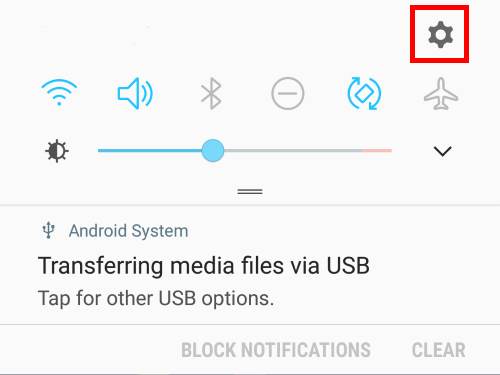
access Galaxy S8 settings in Galaxy S8 and S8+

Method 2:  use settings (gear) icon  in quick settings panel

You can find the same gear icon in Galaxy S8 quick settings panel as shown below.

To access quick settings panel, you can swipe down from status bar with two fingers, or swipe down twice (with … Read the rest

Filed Under: Galaxy S8 How-to Guides Tagged With: Galaxy S8 developer options, Galaxy S8 lock screen, Galaxy S8 notifications, Galaxy S8 quick settings, Galaxy S8 screen zoom, Galaxy S8 settings

Primary Sidebar

Follow Us

  • YouTube
  • Facebook

RSS Galaxy S23 Guides

  • Explanation of all One UI 6.1 features for Galaxy S23, S23+, S23 Ultra, and other Galaxy devices
  • How to use One-Tap Editing in the Android 14 (One UI 6) update?
  • How to enable and use Auto Scan to scan documents automatically on Galaxy S23, S22, and S21?
  • New camera features in One UI 6 (Android 14) update for Galaxy S23, S22, and S21
  • Galaxy S23 User Manual in American English with Android 14 (One UI 6) Update
  • Galaxy S23 User Manual in British English with Android 14 (One UI 6) update
  • How to Use the Drag and Drop with Two Hands Gesture on Galaxy S23, S22, and S21 with Android 14 (One UI 6) update?
  • How to create and use custom stickers on Galaxy S23, S22, S21, and S20?
  • How to use Image Clipper on Galaxy S23, S22, and S21 with Android 14 update (One UI 6)?
  • How to Enable and Use Quick Settings Instant Access on Galaxy S23, S22, and S21 with Android 14 Update?

RSS Galaxy S22 Guides

  • A Complete Guide for Android 14 (One UI 6) Update on Samsung Galaxy Devices
  • How to touch and hold to customize Lock Screen on Galaxy S22, S21, and S20 with the Android 13 update?
  • How to use Maintenance Mode on Galaxy S23, S22, S21, and S20 with Android 13 (One UI 5)?
  • How to extract text from photos and images on Galaxy S22, S21, and S20?
  • A complete list of the new features of One UI 5.1 update for Galaxy S22, S21, and S20
  • How to use multiwindow on Galaxy S22, S21, and S20?
  • How to Use the Help Icon and Histogram for Pro Camera Mode in Android 13 (One UI 5) Update for Galaxy S22, S21, and S20?
  • How to customize the call background on Galaxy S23, S22, S21, and S20 with the Android 13 update (One UI 5)?
  • How to Automatically Add and Customize Watermarks on Photos on Galaxy S22, S21, or S20 with the Android 13 update (One UI 5)?
  • The Definite Guide to Stack Widgets in One UI 5 on Galaxy S23, S22, S21, and S20

RSS Samsung Galaxy S21 Guides

  • Top 12 new features in Android 12 update for Galaxy S21, S20 and S10
  • Android 12 update vs One UI 4.0 vs One UI 4.1: update Galaxy S21, S20 and S10 to Android 12
  • How to set and resize photo size on Samsung Galaxy S21, S20, S10, and S9 without using any third-party apps?
  • How to Customize Galaxy S21 Home Screen?
  • Master Galaxy S21 Lock Screen Settings

RSS Galaxy S20 Guides

  • The End of the Road: No Android 14 Update for the Galaxy S20
  • How to Use Enhanced Processing on Galaxy S20 with Android 11 update?
  • How to access, use, and customise widgets on Galaxy S20 lock screen and AOD screen with Android 11 update for Galaxy S20?
  • How to update Galaxy S20 to Android 11?
  • How to use Galaxy S20 lockdown mode?
  • Top 11 new features in Galaxy S20 Android 11 update

RSS Galaxy S10 Guides

  • End of security update for Galaxy S10, S10+ and S10e
  • Top 10 new features in Android 10 update for Galaxy S10
  • Top 5 new features added in Galaxy S10 September Update
  • How to move apps to the micro SD card to free phone storage on Galaxy S10 ?
  • Galaxy S10 wireless charging guide

RSS Galaxy S9 Guides

  • How to use Bixby quick commands on Galaxy S9, S9+, S8, S8+, Note 8, and Note 9 with the Android Pie update?
  • How to remap Bixby button on Galaxy S9 and S9+ after updating to Android Pie?
  • How to use the updated camera app in Android Pie update for Galaxy S9 and S9 Plus?
  • How to use the rotation toggle to change and lock screen orientation in Android Pie update for Galaxy S9 and S9 Plus?
  • How to lock Galaxy S9 home screen layout on Galaxy S9 and S9+ with Android Pie update?
  • How to use the floating keyboard on Galaxy S9 and S9+ with Android Pie update?

RSS Galaxy S7 Guides

  • How to use Galaxy S7 multi window new features in Android Nougat udpate for Galaxy S7 and Galaxy S7 edge?
  • How to customize Galaxy S7 quick setting buttons after Android Nougat update?
  • Galaxy S7 performance mode in Android Nougat update for Galaxy S7 and Galaxy S7 edge
  • Top 7 new features in Android Nougat update for Galaxy S7 and Galaxy S7 edge

RSS Google Home guides

  • How to Use Quick Gestures on Nest Hub 2nd Gen and Nest Hub Max?
  • Understand the layout of Nest Hub (including Nest Hub 2nd Gen, Google Home Hub)
  • How to control Nest Audio?
  • Nest Audio Guides
  • Layout of Google Nest Mini (Google Home Mini 2nd Gen)
  • How to connect Google Home to a Bluetooth speaker?
  • Meaning of Google Home Mini LED lights and Google Home Max LED lights
  • Google Home Mini Guides
  • Google Home Mini layout and buttons
  • Google Home layout and buttons

RSS Android Guides

  • A Complete Guide to Android ADB Wireless Debugging
  • Android 16: the definitive guide on new features and changes
  • Master Android 15 Easter Egg Game: Landroid
  • New Features and Improvements of Android 15
  • Top 14 new features of Android 14

RSS Chromecast Guides

  • How to enable developer options in Chromecast with Google TV and Google TV Streamer?
  • Meaning of LED light on voice remote for Chromecast with Google TV and Google TV Streamer
  • What’s new in Chromecast 2018 (3rd gen of Chromecast)?
  • How to use VLC media player on PC to stream music and video to Chromecast and Chromecast Audio?

RSS Drive In Singapore

  • Singapore ERP (Electronic Road Pricing): 6 Facts You Need to Know
  • Car Insurance in Singapore Explained
  • Top 5 rules of driving in Singapore safely and legally during COVID-19 Circuit Breaker period
  • Understand COE Price by 10 Simple Questions
  • How to convert a foreign driving license to a Singapore driving license?
  • How to get a Touch ‘n Go card as a Singapore driver?
  • What is covered in the car warranty in Singapore? What is not?
  • What is the Singapore Road Speed Limit?
  • How to register, collect and use Malaysia Vehicle Entry Permit (VEP)?
  • Why are cars in Singapore so expensive?

RSS Galaxy Note Tips & Tricks

  • Top 11 disappointments of Galaxy Note 20 and Galaxy Note 20 Ultra
  • How to use the Dynamic Lock screen on Galaxy Note 10?
  • Galaxy Note 10 LED View Cover Guide and Review
  • Install S Note app and Extension pack on Galaxy Note 10
  • How to Use Galaxy Note 10 Camera App?

RSS Headphone Guides

  • Bone Conduction Audio Technology: A Technical Breakdown
  • Science And Architecture of Bluetooth Auracast
  • Bluetooth LE Audio and the LC3 Codec: A Technical Deep Dive
  • The Physics and Engineering of Super Wide Band (SWB) Voice
  • True Wireless Stereo (TWS) Explained
  • The Complete Technical Guide to the Galaxy Buds 4 & Buds 4 Pro
  • The Right Fit of Galaxy Buds 4 — User Personas & Recommendations
  • Galaxy Buds 4 as an AI Earbud — Tips, Tricks, and Galaxy AI
  • AirPods Pro 3: The Complete Technical Guide and Long-Term Review
  • The Flagship Face-off: Galaxy Buds 4 Pro vs. AirPods Pro 3, Sony WF-1000XM6, and Bose QC Ultra Earbuds II

© 2015–2026 · GadgetGuideOnline.com is an online community for Gadget Owners! · Hosted by PTRHosting · Powered by Genesis framework for WordPress
Samsung Galaxy S8 guide, user manuals and tutorials for Samsung Galaxy S8 and S8 Plus! Everything about how to use Samsung Galaxy S8 and Galaxy S8+.
Disclaimer: Samsung, Galaxy, Galaxy S8, and Galaxy S8+ are trademarks of Samsung. Android is a trademark of Google. This website is NOT affiliated with Samsung or Google in any way. All the information provided on this website is provided on an "as is" and "as available" basis and you agree that you use such information entirely at your own risk.

We use cookies to ensure that we give you the best experience on our website. If you continue to use this site we will assume that you are happy with it.