• Skip to primary navigation
  • Skip to main content
  • Skip to primary sidebar

Galaxy S10 Guides

a owners-help-owners community of Samsung Galaxy S10, S10+ and S10e

  • Home
    • About Galaxy S10 Guides
    • Contact Us
  • New Features
    • End of security update for Galaxy S10, S10+ and S10e
    • Top 10 new features in Android 10 update for Galaxy S10
    • Top 5 new features added in Galaxy S10 September Update
    • Top 10 new features of Galaxy S10
    • Top 10 disappointing or missing features of Galaxy S10
    • How to use the new fingerprint reader to unlock Galaxy S10, Note 10, S20, Note 20, S21, and S22?
    • How to use Galaxy S10 wireless PowerShare to charge other devices?
    • How to use Galaxy S10 home screen landscape mode for Home screen and lock screen?
    • Specifications of Samsung Galaxy S10, S10 Plus, S10e, and S10 5G
    • How to use Galaxy S10 camera night mode?
    • How to use Galaxy S10 night mode?
  • How-to Guides
    • Top 10 new features in Android 10 update for Galaxy S10
      • End of security update for Galaxy S10, S10+ and S10e
      • Top 5 new features added in Galaxy S10 September Update
    • How to charge Galaxy S10 battery?
      • How to use Galaxy S10 wireless PowerShare to charge other devices?
      • Galaxy S10 wireless charging guide
    • Galaxy S10 SIM card guide
      • How to use two SIM cards on Galaxy S10, S10+, S10e, S20, S20+, and S20 Ultra?
    • Meaning of Galaxy S10 status icons and notification icons
      • How to disable or customize the notification icons in the Galaxy S10 status bar?
      • How to enable and use Galaxy S10 developer options?
    • How to use Galaxy S10 Settings?
      • How to use Galaxy S10 quick setting buttons?
      • How to use Galaxy S10 screen zoom?
      • How to use Galaxy S10 edge screen?
      • How to use Galaxy S10 night mode?
      • How to move apps to the micro SD card to free phone storage on Galaxy S10 ?
    • How to take screenshots on Galaxy S10 without using any apps?
    • How to use and customize Galaxy S10 lock screen?
      • How to use Galaxy S10 home screen landscape mode for Home screen and lock screen?
      • How to Use Galaxy S10 Always On Display (AOD)?
    • Galaxy S10 layout (layout of Galaxy S10, S10 Plus, and S10e)
      • How to use Galaxy S10 touchscreen gestures on Galaxy S10, S10+, and S10e?
      • How to use the new fingerprint reader to unlock Galaxy S10, Note 10, S20, Note 20, S21, and S22?
      • How to power on, power off, and reboot Galaxy S10 even when the phone hangs?
    • Understand Galaxy S10 Home Screen
      • How to use Galaxy S10 navigation buttons and navigation gestures?
      • How to hide Bixby Home from Galaxy S10 Home Screen?
      • How to use Galaxy S10 virtual bezel to hide the front camera cutout without using any apps?
      • How to use Galaxy S10 home screen edit mode?
      • How to use Galaxy S10 Apps screen?
      • How to use app folders on Galaxy S10 Home screen and Apps screen?
    • Unbox Galaxy S10: understand Galaxy S10 box contents
      • How to use Samsung Smart Switch to migrate to Galaxy S10?
      • How to hide suggested apps on Galaxy S10? and how to stop Finder uploading your data to Samsung servers?
    • Galaxy S10 camera settings explained
      • How to set photo size on Galaxy S10, S10e, S10 5G, and S10+?
      • How to avoid mirrored photos with Galaxy S10 front camera?
      • How to use Galaxy S10 camera night mode?
  • Camera Guide
    • How to use Galaxy S10 Camera app?
    • Galaxy S10 camera settings explained
    • How to set photo size on Galaxy S10, S10e, S10 5G, and S10+?
    • How to use Galaxy S10 camera night mode?
    • How to avoid mirrored photos with Galaxy S10 front camera?
    • How to use 5 shooting methods for Galaxy S10 camera?
  • User Manual
  • Accessories Guide
    • How To Use Galaxy S10 LED View Cover (Galaxy S10 LED Wallet Cover)?
    • How to use Galaxy S10 LED cover (Galaxy S10 LED back cover)?
    • How to use Galaxy S10 clear view cover (S-View flip cover)?
    • Galaxy S10 wireless charging guide

Specifications of Samsung Galaxy S10, S10 Plus, S10e, and S10 5G

simon · 3 Comments

pecifications of Samsung Galaxy S10, S10 Plus and S10eAlthough software plays a more and more important role in today's smartphones,  many potential Galaxy S10 buyers are still eager to know what are the specifications of Samsung Galaxy S10.

Based on early leaks and rumours, the specifications of the Samsung Galaxy S10 are almost certain in most aspects.

This post summarizes the key specifications of Samsung Galaxy S10, S10 Plus, S10e, and S10 5G.

Update: From April 2023, Samsung stopped releasing security updates for Galaxy S10, S10+, and S10e after  3 major OS updates (Android 10/One UI 2 update, Android 11/One UI 3 update, and Android 12/One UI 4 update) and 4-year security updates.

Table of Contents hide
1) How many models of Galaxy S10 will be?
2) Key features in specifications of Samsung Galaxy S10, S10 Plus, and S10e
3) Specifications of Samsung Galaxy S10, S10 Plus, S10e, and S10 5G
4) Specifications of Galaxy S10, S10+, S10e, and S10 5G
4.1) Related

How many models of Galaxy S10 will be?

Almost certain, tThere will be 3 are 4 Galaxy S10 models with slightly different specifications:

  • Galaxy S10.
  • Galaxy S10+ (Plus).
  • Galaxy S10e.
  • Galaxy S10 5G (in selected markets only).

Galaxy S10 is targeting mainstream users. S10+ (S1o Plus) is targeting hardware enthusiasts who want to get everything available. Galaxy S10e is targeting buyers who want a smaller phone.  All these 3 Galaxy S10 models will be available globally on March 8, 2019.

Galaxy S10 5G is the only 5G capable phone in the market now. It will be available in Q2 2019. Because the 5G network is only available in very limited regions and carriers, Galaxy S10 5G will be available in selected regions. 5G features (e.g., 5G NR, 5G NSA, 5G sub-6, and 5G mmWave) are explained in this guide.

The specifications of Galaxy S10, S10+, S10e, and S10 5G  are slightly different.

Of course, Galaxy S10+ will be the most expensive one among the three (the pricing of S10 5G is still not available now). S10e will be the cheapest.

Key features in specifications of Samsung Galaxy S10, S10 Plus, and S10e

Samsung Galaxy 10 is the 1oth generation of Galaxy S series phones.  Samsung needs to use this historical device to showcase its leadership in the oversaturated smartphone market.

In addition to the annual upgrade of CPU, there are some interesting and major changes in Galaxy S10 specifications.

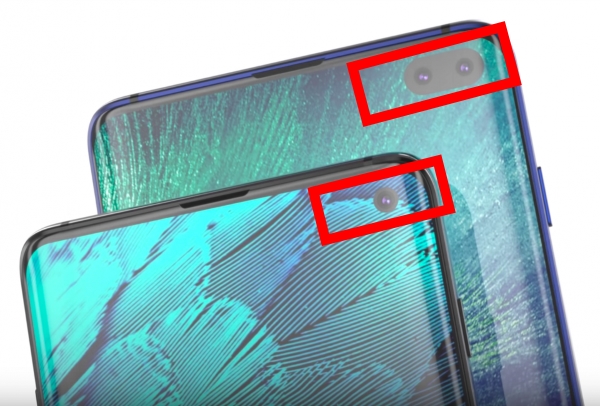
The infinity display will be pushed to the limit: the top bezel is not enough for the camera lens and a hole in the display has to be punched.  So, Samsung just named it Infinity O display. You may hide the hole (cutout) using a black bar (Galaxy S10 virtual bezel) if you do not like the hole. But this will reduce the usable screen area.

So, instead of a notch, you will see the punched area for the front cameras as shown below.
Key features in specifications of Samsung Galaxy S10, S10 Plus, and S10e

The fingerprint scanner will now be embedded under the screen in Galaxy S10, S10+, and S10 5G. And it uses an ultrasonic 3D scanning technique.  There is no button or cutout for the fingerprint scanner.  Please check this guide on how to use Galaxy S1o in-display ultrasonic fingerprint reader.

On Galaxy S10e, the fingerprint scanner will be embedded in the power button on the right side of the phone.

Wireless charging has been a standard feature since Galaxy S6. Now, Samsung will add the wireless PowerShare (reverse wireless charging) to Galaxy S10.  You can use your phone as a wireless charger to charge other devices as explained in this guide.

Galaxy S10, S10+, S10e, and S10 5G will be powered by Android Pie with the new One UI.  Actually, if you have updated your Galaxy S9, S9+, or Note 9 to Android Pie, you are using the One UI already.  You may enjoy the night mode, navigation gestures, the new Recents panel, and some other new features.

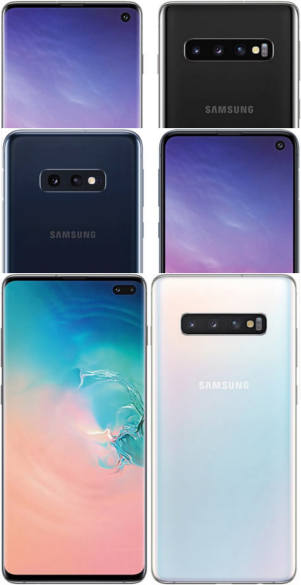
Now, it is a fashion to add more cameras to smartphones. Galaxy S10 Plus will have 3 rear cameras and 2 front cameras. Galaxy S10 will have 3 rear cameras and one front camera. Galaxy S10e will follow Galaxy S9+: 2 rear cameras and one front camera. Galaxy S10 5G has 4 rear cameras (with one time-of-flight camera) and 3 front cameras (with one ToF camera as well).

This post summarizes the top 10 new features of Galaxy S10. And this guide explains the top 10 disappointing or missing features of Galaxy S10.

You may check this guide for the layout of Galaxy S10, S10+, and S10e.

Specifications of Samsung Galaxy S10, S10 Plus, S10e, and S10 5G

Here is the comparison of the Galaxy S10, S10+, S10e, and S10 5G.

Specifications of Galaxy S10, S10+, S10e, and S10 5G

S10+S10S10eS10 5G
CPUExynos 9820 (EMEA), or Snapdragon 855 (USA/LATAM/China)
Screen size (inch, diagonal)6.46.15.86.7
Screen resolutions (pixels)1080 x 22801440 x 30401440 x 30401440 x 3040
RAM and storage6GB (128GB)
8GB (256GB)
8GB (128GB)
8GB (512GB)
8GB (128GB)
8GB (512GB)
12GB (1TB)
8GB (256GB)
OSAndroid Pie (Android 9.0)
Fingerprint scannerEmbedded in the power buttonUltrasonic in-display 3DUltrasonic in-display 3DUltrasonic in-display 3D
Dimensions5.60 x 2.75 x 0.31 (in)5.90 x 2.77 x 0.31 (in)6.20 x 2.92 x 0.31 (in)6.40 x 3.04 x 0.31 (in)
Weight150 g157 g 175g198g
Rear cameras12MP (f/1.5) wide (77 degrees)
16MP (f/2.2) ultra wide (123 degrees)
12MP (f/1.5)
12MP (f/2.4) telephoto (45 degrees)
16MP (f/2.2)
12MP (f/1.5)
12MP (f/2.4) telephoto (45 degrees)
16MP (f/2.2)
12MP (f/1.5)
12MP (f/2.4) telephoto (45 degrees)
16MP (f/2.2)
ToF camera
Front camera10MP (f/1.9)10MP (f/1.9)10MP (f/1.9)
8MP (f/2.2)
10MP (f/1.9)
8MP (f/2.2)
ToF camera
Battery capacity4100 mAh3400 mAh 3100 mAh4500mAh
MSRP (USA)from $750 from $900from $1000TBA

Note: Galaxy S10e, S10, and S10+ will be available from March 8, 2019. Galaxy S10 5G will be available in Q2 2019 for selected carriers.

Do you have any questions about the Specifications of Samsung Galaxy S10, S10 Plus, S10e, and S10 5G? What are the most expected features of the Galaxy S10 you are waiting for?

Please share your thoughts and opinions in the comment box below.

Also, do not forget to subscribe to our Galaxy S10 tip and tricks newsletter.

[newsletter]

Related

Filed Under: S10 new features Tagged With: Android 10, Android 10 update, Android 11, Android 12, Android Pie, Galaxy S10, Galaxy S10 5G, Galaxy S10 camera, Galaxy S10e, infinity O display, One UI, One UI 2.0, One UI 3, One UI 4, specifications, ultrasonic fingerprint scanner, wireless power sharing, wireless PowerShare

Reader Interactions

Comments

  1. pep4uk says

    February 28, 2019 at 12:26 am

    I’m waiting for my s10 us coming on the 8th..when will you have the full manual can you contact me with this info please
    Thankyou

    Reply
    • simon says

      March 7, 2019 at 1:48 pm

      12 languages of Galaxy S10 user manual were added (more to come). Please check.


      -- Our Facebook page || Galaxy S6 Guides || Galaxy S7 Guides || Android Guides || Galaxy S8 Guides || Galaxy S9 Guides || Google Home Guides || Headphone Guides || Galaxy Note Guides || Fire tablet guide || Moto G Guides || Chromecast Guides || Moto E Guides || Galaxy S10 Guides || Galaxy S20 Guides || Samsung Galaxy S21 Guides || Samsung Galaxy S22 Guides || Samsung Galaxy S23 Guides

      Reply
  2. samuel adegoke says

    March 12, 2019 at 10:16 pm

    i’m in love with the galaxy S10

    Reply

Leave a ReplyCancel reply

Primary Sidebar

RSS Galaxy S24 Guides

  • The definitive guide to One UI 7 (Android 15) update for Galaxy S24, S23, S22, and S21
  • The Definitive Guide to Galaxy AI on Galaxy S24, S23, S22, Fold 6, Fold 5, Flip 6, and Flip 5
  • Use the Light Performance Profile to Extend Battery Life and Reduce Heat on Galaxy S24, S23, S22, and S21 (all Samsung Galaxy Phones with Android 14/One UI 6.0)
  • How to adjust lock screen timeout on Galaxy S24, S23, S22, and other Galaxy devices?
  • How to use Circle to Search on Galaxy S24?
  • Meaning of Galaxy S24 status icons and notification icons on Galaxy S24, S24+, and S24 Ultra
  • Samsung Galaxy S24 Smart View Wallet Case: A Definite Guide
  • Understand Galaxy S24 Camera App
  • Galaxy S24 Flipsuit Case: A Definite Guide
  • How to use the new Battery Protection on Galaxy S24?

RSS Galaxy S23 Guides

  • Explanation of all One UI 6.1 features for Galaxy S23, S23+, S23 Ultra, and other Galaxy devices
  • How to use One-Tap Editing in the Android 14 (One UI 6) update?
  • How to enable and use Auto Scan to scan documents automatically on Galaxy S23, S22, and S21?
  • New camera features in One UI 6 (Android 14) update for Galaxy S23, S22, and S21
  • Galaxy S23 User Manual in American English with Android 14 (One UI 6) Update
  • Galaxy S23 User Manual in British English with Android 14 (One UI 6) update
  • How to Use the Drag and Drop with Two Hands Gesture on Galaxy S23, S22, and S21 with Android 14 (One UI 6) update?
  • How to create and use custom stickers on Galaxy S23, S22, S21, and S20?
  • How to use Image Clipper on Galaxy S23, S22, and S21 with Android 14 update (One UI 6)?
  • How to Enable and Use Quick Settings Instant Access on Galaxy S23, S22, and S21 with Android 14 Update?

RSS Galaxy S22 Guides

  • A Complete Guide for Android 14 (One UI 6) Update on Samsung Galaxy Devices
  • How to touch and hold to customize Lock Screen on Galaxy S22, S21, and S20 with the Android 13 update?
  • How to use Maintenance Mode on Galaxy S23, S22, S21, and S20 with Android 13 (One UI 5)?
  • How to extract text from photos and images on Galaxy S22, S21, and S20?
  • A complete list of the new features of One UI 5.1 update for Galaxy S22, S21, and S20
  • How to use multiwindow on Galaxy S22, S21, and S20?
  • How to Use the Help Icon and Histogram for Pro Camera Mode in Android 13 (One UI 5) Update for Galaxy S22, S21, and S20?

RSS Samsung Galaxy S21 Guides

  • Top 12 new features in Android 12 update for Galaxy S21, S20 and S10
  • Android 12 update vs One UI 4.0 vs One UI 4.1: update Galaxy S21, S20 and S10 to Android 12
  • How to set and resize photo size on Samsung Galaxy S21, S20, S10, and S9 without using any third-party apps?
  • How to Customize Galaxy S21 Home Screen?
  • Master Galaxy S21 Lock Screen Settings

RSS Galaxy S20 Guides

  • The End of the Road: No Android 14 Update for the Galaxy S20
  • How to Use Enhanced Processing on Galaxy S20 with Android 11 update?
  • How to access, use, and customise widgets on Galaxy S20 lock screen and AOD screen with Android 11 update for Galaxy S20?
  • How to update Galaxy S20 to Android 11?
  • How to use Galaxy S20 lockdown mode?

RSS Galaxy S9 Guides

  • How to use Bixby quick commands on Galaxy S9, S9+, S8, S8+, Note 8, and Note 9 with the Android Pie update?
  • How to remap Bixby button on Galaxy S9 and S9+ after updating to Android Pie?
  • How to use the updated camera app in Android Pie update for Galaxy S9 and S9 Plus?
  • How to use the rotation toggle to change and lock screen orientation in Android Pie update for Galaxy S9 and S9 Plus?
  • How to lock Galaxy S9 home screen layout on Galaxy S9 and S9+ with Android Pie update?

RSS Galaxy S8 Guides

  • How to use the new features in Android Pie update for Galaxy S8 and S8+?
  • How to use app shortcuts in Galaxy S8 Home screen in Android Oreo update for Galaxy S8 and S8+?
  • Use notification dots/notification number badge in Galaxy S8 Android Oreo update
  • How to Install Galaxy S8 Android Oreo Update for Galaxy S8 and S8+?

RSS Galaxy Note Tips & Tricks

  • Top 11 disappointments of Galaxy Note 20 and Galaxy Note 20 Ultra
  • How to use the Dynamic Lock screen on Galaxy Note 10?
  • Galaxy Note 10 LED View Cover Guide and Review
  • Install S Note app and Extension pack on Galaxy Note 10
  • How to Use Galaxy Note 10 Camera App?
  • Galaxy Note 10 SIM Card Guide
  • How to use Samsung DeX for PC with Galaxy Note 10 and Galaxy Note 10+?
  • How to use Galaxy Note 10 Clear View cover (S View cover)?
  • How to charge Galaxy Note 10 battery?

RSS All About Chromecast

  • How to enable developer options in Chromecast with Google TV and Google TV Streamer?
  • Meaning of LED light on voice remote for Chromecast with Google TV and Google TV Streamer
  • What’s new in Chromecast 2018 (3rd gen of Chromecast)?
  • How to use VLC media player on PC to stream music and video to Chromecast and Chromecast Audio?
  • How to use Chromecast Ultra to stream 4K content?

RSS Headphone Guide Pro

  • Bone Conduction Audio Technology: A Technical Breakdown
  • Science And Architecture of Bluetooth Auracast
  • Bluetooth LE Audio and the LC3 Codec: A Technical Deep Dive
  • The Physics and Engineering of Super Wide Band (SWB) Voice
  • True Wireless Stereo (TWS) Explained

© 2015–2026 · GadgetGuideOnline.com is an online community for Gadget Owners! · Hosted by PTRHosting · Powered by Genesis framework for WordPress

Samsung Galaxy S10 how-to guides, user manuals and tutorials for Samsung Galaxy S10, Galaxy S10+ (S10 Plus) and Galaxy S10e (S10 Lite) owners.

Disclaimer: Samsung, Galaxy, Galaxy S10, Galaxy S10+ (S10 Plus) and Galaxy S10e (S10 Lite)are trademarks of Samsung. Android is a trademark of Google. This website is NOT affiliated with Samsung or Google in any way. All the information provided on this website is provided on an "as is" and "as available" basis and you agree that you use such information entirely at your own risk.

We use cookies to ensure that we give you the best experience on our website. If you continue to use this site we will assume that you are happy with it.