 About Samsung Galaxy S24 Guides
Galaxy S24 Guides is a website that offers comprehensive how-to guides for the Samsung Galaxy S24 and other popular gadgets. It’s part of the how-to guides network of GadgetGuideOnline.com, a platform that has been providing free and reliable how-to guides for various gadgets since its launch in 2015. GadgetGuideOnline.com has become a go-to source for those seeking guidance on how to use and troubleshoot their gadgets. The website covers a wide range of devices, including Samsung Galaxy S phones, Galaxy Note phones and tablets, Android, Google Home, Chromecast, headphones & earbuds, Pixel phones, Amazon Fire tablets, Moto G phones, Moto X phones, Motorola Razr, and Moto E phones. The guides are written in a concise and easy-to-understand manner and are suitable for beginners and advanced users alike. They cover various topics, such as setting up devices, troubleshooting common issues, optimizing device performance, and maximizing battery life. With Galaxy S24 [email protected], you can be confident that you’ll have access to reliable and informative guides that can help you get the most out of your gadgets.
Galaxy S24 Guides@GadgetGuideOnline is an open community for owners of Galaxy S24, S24+, and S24 Ultra.
Our Galaxy S24 how-to guides stand out from others in terms of:
- Accuracy
- Detail
- Quality
We put each guide through thorough testing and validation on the actual device multiple times to ensure they always work as intended. Our guides also include detailed steps and screenshots, making them accessible to anyone regardless of their technical background. Additionally, each guide includes a concise introduction that explains the specific scenarios in which the featured functions may be needed. Our focus is on delivering high-quality guides that meet our strict standards rather than simply pumping out a high volume of content.
All our Galaxy S24 how-to guides are free, just like the guides on our other sites/sections. No subscription. No registration. You can access all these high-quality Galaxy S24 guides anytime from any device.
You can also get the latest updates on Galaxy S24 updates, guides, tips, and tricks by subscribing to the newsletter. It is totally free and optional. Normally, we send out the newsletter once to twice each month.
To help you navigate, we grouped Galaxy S23 guides into the following five sections:
- The Galaxy S24 New Features Guides section is an informative resource designed to aid users in understanding the new features and capabilities of the Galaxy S24, S24+, and S24 Ultra smartphones. These guides provide a detailed explanation of the cutting-edge features and highlight their practical applications. Additionally, the guides offer step-by-step instructions that enable users to make the most of these new features. Whether you are a casual user or a power user, the Galaxy S24 New Features Guide is an invaluable resource that will help you stay ahead of the curve in the fast-paced world of mobile technology.
- The Galaxy S24 How-to Guides offer an extensive range of guides that provide detailed guidance on how to use and personalize the Galaxy S24, S24+, and S24 Ultra devices. These comprehensive guides cover all aspects of using the Galaxy S24, S24+, and S24 Ultra, including hardware and software features, Android and One UI functionalities, and migration and sharing procedures. By referring to the Galaxy S24 How-to Guides, users can obtain a thorough understanding of the operation and customization of their Galaxy S24 devices.
- The Galaxy S24 Camera Guides section contains a comprehensive collection of how-to guides on how to effectively utilize the Galaxy S24 camera to take stunning photos and record flawless videos. Additionally, it covers the use of the photo editor on the Galaxy S24. For individuals looking to improve their photography and videography skills, this is an invaluable resource.
- The Galaxy S24 Accessories Guides section provides comprehensive guides on the use of various accessories that are designed to enhance functionality and safeguard the Galaxy S24, S24+, and S24 Ultra devices. These guides cover diverse topics, including the utilization of protective accessories and the expansion of the features and capabilities of the aforementioned devices. Additionally, this section delves into in-depth reviews of specific Galaxy S24 accessories.
- The Galaxy S24 User Manual section consists of the official Samsung Galaxy S24 user manual in PDF format. These user manuals were released by Samsung in various regions and have been compiled and organized according to the corresponding languages. It is presented in a comprehensive and structured manner, making it easier for users to access the information they need.
List of recent Samsung Galaxy S24 guides
Here is a list of recent Samsung Galaxy S24 guides. For a complete list of Galaxy S24 guides, please check the Galaxy S24 guides.

The definitive guide to One UI 7 (Android 15) update for Galaxy S24, S23, S22, and S21
simon
One UI 7 (Android 15) update has been rolled out to Galaxy S24, S23, S22, and S21 in most regions.
This Galaxy S24 new features guide explains everything you need to know about the One UI 7 (Android 15) update for the Galaxy S24, S23, S22, and S21. It covers what the update entails, which devices will receive it, and when the update will be(has been) available. Additionally, a complete list of the new features, along with detailed explanations, is included to help you understand the One UI 7 (Android 15) update.
The One UI 7 (Android 15) update has similar features across various Galaxy devices, including the Galaxy S series, Galaxy Z series, Galaxy A series, Galaxy M series, and Galaxy Tab S series. Therefore, this guide is applicable to all Galaxy devices that have received or will receive the One UI 7 update.
Table of contents
The post The definitive guide to One UI 7 (Android 15) update for Galaxy S24, S23, S22, and S21 appeared first on Samsung Galaxy S24 Guides@GGO.
The Definitive Guide to Galaxy AI on Galaxy S24, S23, S22, Fold 6, Fold 5, Flip 6, and Flip 5
simon
Galaxy AI, Samsung's AI features for Galaxy phones and tablets, was first introduced with Galaxy S24. It was later added to Galaxy S23, S22, Galaxy Fold 5, Fold 4, Flip 5, and Fold 4 through the One UI 6.1 update. Galaxy Fold 6 and Flip 6 were released with a few additional Galaxy AI features, which were then added to Galaxy S24, S23, S22, Fold 5, Fold 4, Flip 5, and Flip 4, through the One UI 6.1.1 update.
With the rapid development of AI technologies, confusing marketing terms, and overhyping in AI usage, more and more Galaxy device owners do not fully understand the available AI features on their Galaxy phones and tablets.
This Galaxy S24 new features guide explains all Galaxy AI features available in Galaxy S24 and other Galaxy devices with One UI 6.1.1. These features include:
- Circle to Search
- Browsing Assist
- Live Translate
- Interpreter
- Transcript Assist
- Note Assist
- Chat Assist
- Photo editing suggestions
- Generative Edit
- Sketch to Image (Drawing Assist)
- Instant Slow-mo
- Writing Assist (Samsung Keyboard)
- Generative AI wallpapers
- Translate with Auto Scan
- Suggested actions for Smart Select
- Photo ambient wallpaper
All these Galaxy AI features are available on Samsung Galaxy devices with One UI … Read the rest
The post The Definitive Guide to Galaxy AI on Galaxy S24, S23, S22, Fold 6, Fold 5, Flip 6, and Flip 5 appeared first on Samsung Galaxy S24 Guides@GGO.
Use the Light Performance Profile to Extend Battery Life and Reduce Heat on Galaxy S24, S23, S22, and S21 (all Samsung Galaxy Phones with Android 14/One UI 6.0)
simon
Galaxy S24 comes with the performance profile (aka performance mode) option. You can switch to the light performance profile (aka light performance mode or light mode) to extend battery life and reduce the heat generated without affecting the usage or speed for almost all tasks.
This Galaxy S24 how-to guide explains the two performance profiles of Galaxy S24, namely, the standard performance profile and the light performance profile. We will also show you when and how to enable and disable them. The differences between the light performance profile, battery protection, power saving mode, and data saver will also be discussed. Some additional battery-saving tips are also provided.
Performance profiles were actually first introduced in the Android 14 (One UI 6)update for Galaxy S23, S22, S21, and other Galaxy phones. So, you can use the light performance profile (light performance mode) on all Samsung Galaxy devices with Android 14, e.g., Galaxy S24, S23, S22, and S21.
Table of contents
The post Use the Light Performance Profile to Extend Battery Life and Reduce Heat on Galaxy S24, S23, S22, and S21 (all Samsung Galaxy Phones with Android 14/One UI 6.0) appeared first on Samsung Galaxy S24 Guides@GGO.
How to adjust lock screen timeout on Galaxy S24, S23, S22, and other Galaxy devices?
simon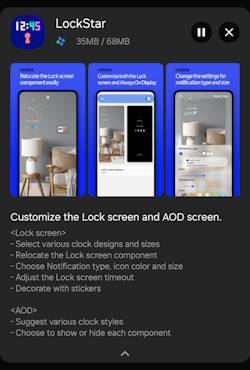
There is no lock screen timeout entry in the Settings of all Android phones (including the Galaxy S24 and other Galaxy phones). You may wonder whether and how you can adjust (usually extend) the lock screen timeout on the Galaxy S24 and other Android devices.
This Galaxy S24 how-to guide explains why you cannot control the lock screen timeout on the Galaxy S24 with the screen (display) timeout setting and then shows you two methods you can use to extend the lock screen timeout up to 10 minutes on the Galaxy S24 and other Galaxy devices.
The accessibility timeout (Time to take action) method discussed in this guide applies to all Android phones with Android 10 or newer. The Good Lock method is for Galaxy S24 and other Galaxy devices (with Android Pie or later) only.
Table of contents
- Why you cannot control the lock screen timeout through the screen timeout (display timeout) setting?
- Two methods of adjusting lock screen timeout on Galaxy S24, S23, S22, and other Galaxy devices
- Adjust lock screen timeout with Accessibility timeout on Android devices with Android 10 or later
- Adjust lock screen timeout with the Good Lock (Lock star) on Galaxy S24 and other
The post How to adjust lock screen timeout on Galaxy S24, S23, S22, and other Galaxy devices? appeared first on Samsung Galaxy S24 Guides@GGO.
How to use Circle to Search on Galaxy S24?
simon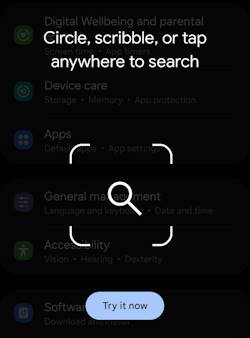
Circle to Search, a new way to search anything within any app, was announced as a new feature of Galaxy S24. Google later made it also available on some Pixel phones.
This Galaxy S24 new feature guide explains what Circle to Search is, how to turn this feature on and off, and how to use Circle to Search on Galaxy S24.
Because Circle to Search is provided by Google, many Android phones, e.g., Pixel phones and Galaxy phones, will also get this feature through a feature update. This guide applies to all Android phones (e.g., Galaxy S23, Galaxy S22, Pixel 8, and Pixel Pro 8) with the Circle to Search feature. For example, Galaxy S23, S23+, and S23 Ultra have already received the One UI 6.1 update with Circle to Search as part of the Galaxy AI.
With One UI 6.1.1 and One UI 7 updates, Sound Search and math-solving were added to Circle to Search.
Table of contents
What is
The post How to use Circle to Search on Galaxy S24? appeared first on Samsung Galaxy S24 Guides@GGO.
Meaning of Galaxy S24 status icons and notification icons on Galaxy S24, S24+, and S24 Ultra
simon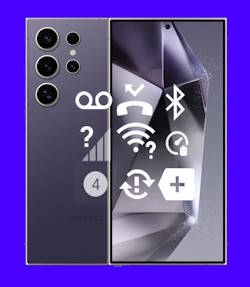
Galaxy S24 status icons and notification icons provide critical information regarding the phone's battery level, connectivity status, signal strength, and notifications from specific applications. It is essential to comprehend the meaning of these icons to optimize the usage of Galaxy S24, Galaxy S24+, or Galaxy S24 Ultra and get the most from the updated hardware and new features.
This Galaxy S24 how-to guide explains the meaning of Galaxy S24 status icons and notification icons shown on Galaxy S24, Galaxy S24+, and Galaxy S24 Ultra. The differences between Galaxy S24 status icons and notification icons are also explained. These icons are grouped into 8 categories to make it easier for you to locate them.
Just so you know, Samsung uses slightly different icons in some regions or for different carriers, which may result in a few Galaxy S24 status icons and notification icons appearing different from those shown in this guide. This is an expected occurrence. If you have trouble understanding the meaning of those icons, we recommend you share a screenshot of them on our Facebook page. The community will help you identify and understand the icons in question.
Table of contents
The post Meaning of Galaxy S24 status icons and notification icons on Galaxy S24, S24+, and S24 Ultra appeared first on Samsung Galaxy S24 Guides@GGO.
Samsung Galaxy S24 Smart View Wallet Case: A Definite Guide
simon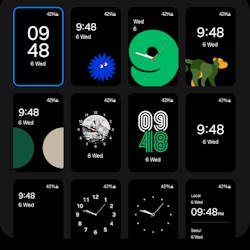
The Samsung Galaxy S24 Smart View Wallet Case, also known as the Galaxy S24 S View Wallet Case or Galaxy S24 Clear View Case, is a unique flip case for Galaxy S24. It has gained popularity among Galaxy phone users since Galaxy S4.
This Galaxy S24 accessories guide explains the unique features of the Galaxy S24 Smart View (S View) Wallet case, how to attach, remove, and customize the Galaxy S24 Smart View (S View) Wallet case, and how to use the S View window on Galaxy S24. Also, you can find a concise review of the Samsung Galaxy S24 Smart View (S View) Wallet Case, along with answers to some of the most common questions about this case.
Please note that the Smart View (S View) Cover for Galaxy S24, S24+, and S24 Ultra have different sizes to match the size and layout of the corresponding phones. This means that they cannot be used interchangeably. However, their features and functions are the same. When we use the term “Galaxy S24” in this guide, we are referring to all three of these models.
The post Samsung Galaxy S24 Smart View Wallet Case: A Definite Guide appeared first on Samsung Galaxy S24 Guides@GGO.
Understand Galaxy S24 Camera App
simon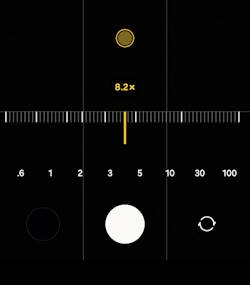
Mastering the Galaxy S24 Camera app allows you to get better photos and videos from Galaxy S24, Galaxy S24+, or Galaxy S24 Ultra.
This Galaxy S24 Camera guide explains the meaning and usage of all items and options on the Galaxy S24 Camera app to help you understand and use the camera effectively.
While the Galaxy S24 and Galaxy S24+ share similar camera features, the Galaxy S24 Ultra boasts significant differences in camera lens technology. However, it's worth noting that all three models share an almost identical Galaxy S24 Camera app. As a result, this guide applies to all Galaxy S24 models, regardless of the camera hardware.
In this guide, the meaning and usage of the following 20 items in the Galaxy S24 Camera app will be explained.
- Preview screen.
- Camera access status icon.
- Camera settings.
- Flash.
- Timer.
- Aspect ratio.
- Photo size.
- Motion photo.
- Effects (Filters/Face/Color tone).
- Zoom control.
- Camera mode.
- Shortcut to Gallery app.
- Shutter button.
- Front/rear camera switch.
- Super Steady.
- Video size.
- Auto framing.
- Focus enhancer.
- Auto Scan (Text recognition).
- Night shot.
We now go through them one by one.
Table of contents
The post Understand Galaxy S24 Camera App appeared first on Samsung Galaxy S24 Guides@GGO.
Galaxy S24 Flipsuit Case: A Definite Guide
simon
The Galaxy S24 Flipsuit Case is an innovative accessory that is compatible with the Galaxy S24, Galaxy S24+, and Galaxy S24 Ultra. This case features an interactive card that, when attached, automatically matches the lock screen of the phone, providing a unique and personalized experience.
This Galaxy S24 accessories guide explains how the Galaxy S24 Flipsuit Case works, its unique features, and how to attach and use the Galaxy S24 Flipsuit Case. A concise review of the Galaxy S24 Flipsuit Case and answers to the frequently asked questions about the case are also provided in the guide.
The Flipsuit Case for Galaxy S24 is available for Galaxy S24, Galaxy S24+, and Galaxy S24 Ultra. The only difference is the fitting. So, this guide applies to all these flipsuit cases.
Table of contents
The post Galaxy S24 Flipsuit Case: A Definite Guide appeared first on Samsung Galaxy S24 Guides@GGO.
How to use the new Battery Protection on Galaxy S24?
simon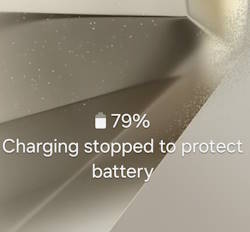
The new Battery Protection on the Galaxy S24 can be utilized to extend the longevity of the battery life on all models of the Galaxy S24, including the S24, S24+, and S24 Ultra. It is an upgraded version of the Protect Battery.
This Galaxy S24 how-to guide provides a detailed explanation of the 3 modes of Battery Protection on Galaxy S24, the relationship to the old Protect Battery, and shows you how to enable and use this feature to maintain the health of the battery on the Galaxy S24, S24+, and S24 Ultra. This guide is intended to help owners of the Galaxy S24 series to better understand the new Battery Protection feature on Galaxy S24 and learn how to leverage it effectively to ensure maximum battery life.
Currently, the new Battery Protection feature is exclusive to Galaxy S24 (Android 14/One UI 6.1). For owners of Galaxy S23, S22, or S21 running on One UI 6 (Android 14), One UI 5.1/5.0 (Android 13), or One UI 4 (Android 12), you can use the existing Protect Battery. Very likely, Samsung will include this new Battery Protection in the One UI 6.1 update for … Read the rest
The post How to use the new Battery Protection on Galaxy S24? appeared first on Samsung Galaxy S24 Guides@GGO.