
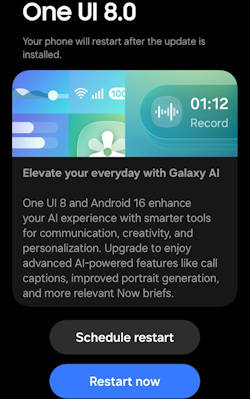
The One UI 8 update brings an array of exciting enhancements to Galaxy S25, S24, S23, and S22 devices, focusing on integrating advanced artificial intelligence features and optimizing user experience (see the list of all new features of One UI 8). With its foundation built on Android 16, One UI 8 is designed to elevate the way users interact with their devices, offering personalized suggestions, refined photo editing tools, and seamless multitasking capabilities. As Galaxy AI becomes a central feature of the user experience, One UI 8 aims to provide a smarter, more personalized, and visually appealing interface that adapts to individual user needs.
This Galaxy S25 new features guide aims to highlight the notable features introduced with the One UI 8 update. It provides a comprehensive analysis of the key enhancements within this update and underscores its significance for users of the Galaxy S25, S24, S23, and S22 models, enhancing your understanding of the new capabilities brought by One UI 8.
One UI 8 update has been rolled out to multiple Galaxy devices. Most of the new features are available on all devices. Therefore, this guide applies to most of the Galaxy devices with the One UI 8 (Android 16) update, not limited to Galaxy S25, S24, S23, and S22. You may also check the complete list of new features of One UI 8 and their usage.
Multimodal Intelligence: New Galaxy AI features
One UI 8 establishes Galaxy AI as a fully integrated, foundational layer within the software stack, moving beyond simple application features to optimizing complex user interactions through advanced multimodal capabilities.
Now Brief Enhancements and Personalized Suggestions
Utilizing the underlying Personal Data Intelligence (PDI) system, Now Brief provides personalized, proactive suggestions based on recognized user routines and context. These updates include real-time information such as traffic, important reminders, and “Samsung Moments,” which allow you to reflect on your daily patterns. You may refer to this guide on accessing and customizing the Now Brief on Galaxy S25.
In One UI 7, the Now Brief feature was initially exclusive to the Galaxy S25. It is now available for a wider range of devices with the One UI 8 update.
In One UI 8, personalized recommendations now incorporate music and video picks tailored to subscriptions and interests, and health insights are seamlessly integrated directly from the Galaxy Watch ecosystem.
AI-Powered Portrait Studio
The AI-Powered Portrait Studio, which was first introduced in One UI 6.1.1, expands the capabilities of the Photo Assist feature in the One UI 8 (Android 16) update. One UI 8 update notably introduces four new pet profiles designed to automatically convert photos of animals into high-quality studio-style portraits.
Photo Assist Comparison View
In image review, the Photo Assist Comparison View simplifies the review process and makes it easier to evaluate and compare the specific changes applied. After modifying an image using Galaxy AI’s Photo Assist, you can now immediately view the original image side-by-side with the edited version directly on the screen.
Audio Eraser
Samsung introduced Audio Eraser for video editing in One UI 7 (Android 15) to automatically reduce the volume of wind and other background noises. In the One UI 8 update, Audio Eraser was updated on two fronts. Firstly, it is now aligned with Android 16's Audio Eraser (as in Google Pixel devices). Secondly, it is extended to more apps. You can use Audio Eraser in Gallery, Video Player, Samsung Notes, Voice Recorder, and Phone apps with the One UI 8 update.


AI Results View
AI Results View in One UI 8 update represents a significant architectural change to support AI workflows. This new feature of One UI 8 specifically formalizes the display of generative and analytical AI output, particularly benefiting large screen form factors like the Galaxy S25 Ultra and Galaxy S tablets. The system displays AI-generated results—such as notes summaries or image recognition data—in a dedicated, separate interface layer, either as a Split View or a Floating View (pop-up view).
This user experience (UX) change ensures that the original source content remains fully visible and unobstructed, allowing you to view the AI output simultaneously alongside the application (original content).
Optimized Multi Window Integration
One UI 8 introduces Optimized Multi Window Integration for Galaxy AI. You can now easily drag and drop AI-generated content—including images, text snippets, or analytical results—directly from the AI Results View into other applications running concurrently in the Multi Window environment.
Performance Optimization with Android 16
One UI 8 is based on Android 16, focusing on deep system optimization to deliver measurable, system-level performance gains on the Galaxy devices. Scuh a performance boost is essential to support the high computational demands of the integrated Galaxy AI features.
The optimization efforts of One UI 8 translate into tangible results, particularly in single-threaded performance. Benchmark performed on a Galaxy S25 model running One UI 8 revealed an improvement of up to a 32 percent performance gain in single-core scores compared to the same device operating on One UI 7. This performance increase, achieved through optimization between the One UI 8 kernel (Android 16), directly translates to heightened application responsiveness, smoother graphical rendering, and reduced input latency across the device.
This substantial performance enhancement is not merely an improvement in speed but is a necessary technical requirement for enabling a seamless AI experience. Features such as real-time captions and complex generative editing must operate instantaneously to be useful and reliable. The performance boost is a prerequisite for the satisfactory operation and user trust in the new, deeply integrated Galaxy AI features.
User Experience, Design, and Personalization
One UI 8 focuses on delivering functional refinement and deeper, AI-driven personalization, particularly visible in the lock screen design and through enhanced navigation consistency based on the underlying Android 16 core.
Visual Refinement and Aesthetic Consistency
The overall interface retains the aesthetic language established in One UI 7, with the focus on “fine-tuning”. The visual philosophy emphasizes clarity and ease of use, incorporating subtle dimensional qualities achieved through soft blurring effects and seamlessly blended components. This approach aims to deliver an immersive visual experience that is “easy on the eyes, easy to use”. App refinements include minor UI adjustments in Samsung applications, such as the use of encircled buttons in pop-out menus and new background blur effects.
Lock Screen Customization
A major personalization highlight in the One UI 8 update is the introduction of the Adaptive Clock Style with Depth-Sensing. The new lock screen clock dynamically changes its size and position. It utilizes depth detection algorithms to wrap its display around the subject of the wallpaper—whether a person or an object—creating a subtle, layered visual depth effect.
Furthermore, the integration of AI Wallpaper Creation and Suggestions allows you to easily generate custom wallpapers, drawing inspiration from Galaxy AI's suggestions and themes, or leveraging auto-curated options directly from the Gallery.
Navigation and Interface Flow
Navigation in One UI 8 update is subtly improved through refinements based on Android 16 features and adjustments to core Samsung apps. The native Android 16 feature of the Predictive Back Gesture is integrated, allowing you to preview the destination screen before fully completing the back action. This feature is enabled by default for users utilizing the 3-button navigation bar and is accessible via the Labs menu for gesture navigation users.
In the photography workflow, the default action of swiping up or down in the camera preview area (which previously toggled between the front and rear cameras) can now be reconfigured via settings. You can enable the swipe gesture to open the Camera Quick Controls panel instead, providing faster, more efficient access to adjustment settings.
Notification handling also receives updates that prioritize information clarity. Improved Notification Management includes displaying an aggregated counter when multiple notifications are received from the same sender, which helps reduce visual clutter in the notification shade. Concurrently, lock screen notification permissions are now managed on a stricter, per-app basis, enhancing user control over privacy.
Finally, the Redesigned Reminders App features a streamlined interface with categories prominently displayed at the top of the screen, allowing you to quickly assess the task load in each category. Custom categories can be temporarily hidden to maximize screen space. The addition of smart suggestions that appear as you type streamlines the process of adding new reminders, further prioritizing ease of input.
Security Enhancements
The One UI 8 update significantly fortifies the Knox security framework, introducing major architectural shifts focused on protecting the sensitive, personalized data generated by on-device AI and establishing robust network defense against current and future computational threats.
Protecting Personalized Data via KEEP
At the core of Samsung’s privacy architecture for AI is the introduction of Knox Enhanced Encrypted Protection (KEEP). This new system-level architecture is explicitly designed to safeguard the Galaxy Personal Data Engine (PDE), which collects and processes sensitive, routine-based personal insights. These data are required to generate proactive, context-aware AI suggestions.
KEEP operates by creating encrypted, app-specific storage environments within the device’s secure storage area. This mechanism ensures that each application can access only its specific sensitive information and nothing further. This intentional isolation of data prevents leakage and reinforces a “privacy-by-design” philosophy. KEEP is Samsung's direct architectural solution to the inherent privacy challenges posed by deep AI personalization, allowing the company to offer highly adaptive and proactive AI functionality while strictly maintaining data isolation and user trust.
Proactive Network Defense (PQC Secure Wi-Fi)
One UI 8 takes a step towards long-term security readiness by upgrading Secure Wi-Fi to integrate Post-Quantum Cryptography (PQC). This cryptographic upgrade is a forward-looking defense designed to resist theoretical attacks from future quantum computers, which pose a long-term threat to breaking current standard encryption protocols.
The enhanced Secure Wi-Fi feature set includes:
- Auto Protect: Automatically initiates encryption when the device connects to public or untrusted Wi-Fi networks, such as those found in cafés or airports.
- Enhanced Privacy Protection (EPP): This feature adds layered encryption and routing through anonymous relays to anonymize internet traffic, mitigating tracking and surveillance risks.
- Protection Activity Dashboard: Provides transparent visibility into which apps and networks were secured, along with the volume of encrypted data usage over time.
Cross-Device Risk Management (Knox Matrix)
The Knox Matrix framework evolves in One UI 8 to deliver more proactive, real-time risk assessment across the user's interconnected ecosystem of Galaxy devices. This automated threat mitigation feature is designed to protect the integrity of the Samsung Account and cloud services. If any connected device is flagged for a serious security risk—such as system manipulation or identity forgery—Knox Matrix automatically signs the device out of the Samsung Account. This action cuts off access to cloud-connected services, preventing the threat from spreading throughout the user’s ecosystem.
![SAMSUNG Galaxy Ring, AI Smart Ring, Size First w/Sizing Kit, No App Subscription, Fitness Monitor, Sleep Tracker, Up to 7-Day Battery, Size 10, Titanium Gold [US Version, 1Yr Manufacturer Warranty]](https://m.media-amazon.com/images/I/41R1PkmCQxL._SL160_.jpg)
![Samsung Galaxy Watch 7 40mm Bluetooth AI Smartwatch w/Energy Score, Wellness Tips, Heart Rate Tracking, Sleep Monitor, Fitness Tracker, 2024, Green [US Version, 1Yr Manufacturer Warranty]](https://m.media-amazon.com/images/I/41ew4GQ5kML._SL160_.jpg)

Workflow Efficiency
One UI 8 adapts its core platform tools, particularly DeX, to align with the stability of Android 16 while advancing essential communication features through sophisticated, real-time AI processing.
Samsung DeX Overhaul
Android 16 adopted many multi-window implementations from Samsung and made them the standard in Android.
In a major architectural decision, Samsung DeX is rebuilt upon the foundation of Android 16’s native Desktop Mode. This shift represents a deliberate move away from maintaining a purely custom DeX software implementation, which ensures greater stability, long-term compatibility with future Android versions, and potentially broader support for third-party desktop applications.
While adopting the Android 16 desktop base, DeX retains critical Samsung differentiation and functionality. This includes Customization Retention, specifically enhanced display support that allows users to adjust the display resolution and rotate the DeX UI on an external monitor. For example, you can pivot the UI to portrait orientation if the monitor is physically rotated.
Communication and Accessibility Enhancements
The deployment of sophisticated AI in the One UI 8 update is leveraged to break down communication barriers, resulting in two major accessibility features:
Real-Time Call Captions introduces instant transcription of both sides of a phone conversation directly into text. While a significant resource for users with hearing impairments, this feature also provides universal benefits, facilitating seamless communication and record-keeping in noisy or distraction-prone environments.
The Keyboard Interpreter extends the existing Interpreter feature to support text input. This allows you to type and instantly translate ideas, removing the necessity of voice input for seamless cross-language communication.
Additionally, Circle to Search with Google receives targeted enhancements, offering in-the-moment assistance during gaming sessions. You can circle specific characters or on-screen elements to instantly receive strategic information, links, and related videos, offering a seamless path to navigational help without leaving the game environment.
Native Application and System Utility Refinements
The One UI 8 offered several refinements to core system applications. The native Samsung Internet Browser receives structural and visual updates. Quick Share undergoes specific improvements aimed at making the file-sharing process easier and more streamlined. Finally, general utility is enhanced through Improved Calendar and Reminder Management, complementing the visual redesign of the Reminders application.
Do you have any questions about One UI 8 Update Highlights for Galaxy S25, S24, S23, and S22?
Please let us know them in the comment box below if you have any questions on One UI 8 Update Highlights for Galaxy S25, S24, S23, and S22.
The community will help you.
You may check other sections of Galaxy S25 Guides: Everything about Galaxy S25:

- The Galaxy S25 News and Updates section provides the latest news, updates, and analyses for Samsung Galaxy S25, S25+, S25 Ultra, and S25 Slim. You can find a broad range of topics, including Galaxy S25 specifications, design features, One UI updates, and market dynamics so that Galaxy S25 owners or potential owners can remain well-informed about the latest updates and trends of Galaxy S25.
- The Galaxy S25 New Features Guides deliver an in-depth analysis of the advancements and new capabilities of the Galaxy S25, S25+, and S25 Ultra models compared to their predecessors in the Galaxy S series, as well as other leading Android flagship devices. These guides are an invaluable resource for answering technical questions related to Galaxy S25, while also offering detailed insights and comparative evaluations to facilitate informed decision-making in the purchasing process.
- The Galaxy AI Guides section comprises a thorough collection of resources and tools aimed at assisting users in effectively navigating and using the features of Galaxy AI on Galaxy S25, S25+, and SD25 Ultra. This section includes detailed explanations, comprehensive step-by-step instructions, and expert recommendations. Each guide is specifically designed to address particular functionalities, ensuring that individuals, regardless of their experience level, can enhance their knowledge and efficiency in utilizing Galaxy AI.
- The Galaxy S25 How-to Guides provide an extensive array of resources that deliver comprehensive instructions on using and personalizing the Galaxy S25, S25+, and S25 Ultra. These thorough guides encompass all facets of operating the Galaxy S25 series, including hardware and software features, functionalities of the Android operating system and One UI, as well as procedures for migration and data sharing. By consulting the Galaxy S25 How-to Guides, you can gain an in-depth understanding of both the capabilities and customization options available for your Galaxy S25, S25+, and S25 Ultra.
- The Galaxy S25 Camera Guides section offers a comprehensive compilation of instructional resources designed to assist Galaxy S25 owners in effectively using the Galaxy S25 camera for capturing exceptional photographs and recording high-quality videos. Additionally, it includes guidance on the application of the photo (and video) editor available on the Galaxy S25, S25+, and S25 Ultra.
- The Galaxy S25 Accessories Guides section offers detailed guides on the usage of various accessories specifically designed to enhance functionality and protect the Galaxy S25, S25+, and S25 Ultra. These guides cover a wide range of topics, including protective accessories and feature augmentation accessories. Furthermore, this section provides comprehensive reviews of specific accessories for Galaxy S25, S25+, and S25 Ultra.
- The Galaxy S25 User Manual section comprises the official user manual for the Samsung Galaxy S25, S25+, and S25 Ultra, available in PDF format. These user manuals have been released by Samsung across various regions and are organized according to the respective languages. The content of this material is comprehensive and structured, facilitating easier access to the necessary information for Galaxy S25 owners.
- The Galaxy S25 Reviews section is dedicated to reviews of the Galaxy S25, S25+, and S25 Ultra and their accessories. These reviews are all based on our own usage as consumers. Depending on the objects being reviewed, Galaxy S25 reviews include detailed technology and design evaluations, everyday usage and performance, and comparison to other similar products.
You can also reach us through:
- Our Facebook page.
- Our YouTube channel.
- Contact Us page.
Don't miss out on the latest updates, guides, tips, and tricks for the Samsung Galaxy S25 – sign up for our newsletter now!
The One UI 8 update for the Galaxy S25, S24, S23, and S22 brings meaningful improvements that enhance everyday use. Samsung has added upgraded AI features that provide smarter suggestions, better text understanding, and more natural device interactions. The interface feels cleaner and more customizable, with new options for lock-screen layouts, widgets, and wallpapers. Performance is smoother across all supported models, and battery optimization has been refined for longer use. Security also gets a boost with stronger protection for apps and personal data. Overall, One UI 8 delivers a more intelligent, secure, and polished experience across the entire Galaxy lineup.