camera

One UI 8 Update Highlights for Galaxy S25, S24, S23, and S22
Galaxy S25 How-to Guides, Galaxy S25 New Features

One UI 8 Update Highlights for Galaxy S25, S24, S23, and S22

One UI 8 Update Highlights for Galaxy S25, S24, S23, and S22

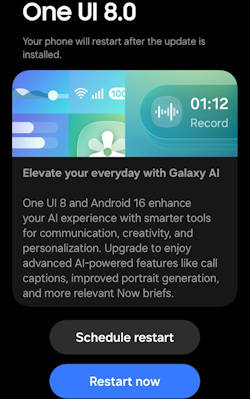
The One UI 8 update brings an array of exciting enhancements to Galaxy S25, S24, S23, and S22 devices, focusing on integrating advanced artificial intelligence features and optimizing user experience (see the list of all new features of One UI 8). With its foundation built on Android 16, One UI 8 is designed to elevate the way users interact with their devices, offering personalized suggestions, refined photo editing tools, and seamless multitasking capabilities. As Galaxy AI becomes a central feature of the user experience, One UI 8 aims to provide a smarter, more personalized, and visually appealing interface that adapts to individual user needs.

This Galaxy S25 new features guide aims to highlight the notable features introduced with the One UI 8 update. It provides a comprehensive analysis of the key enhancements within this update and underscores its significance for users of the Galaxy S25, S24, S23, and S22 models, enhancing your understanding of the new capabilities brought by One UI 8.

One UI 8 update has been rolled out to multiple Galaxy devices. Most of the new features are available on all devices. Therefore, this guide applies to most of the Galaxy devices with the One UI 8 (Android 16) update, not limited to Galaxy S25, S24, S23, and S22. You may also check the complete list of new features of One UI 8 and their usage.

Multimodal Intelligence: New Galaxy AI features

One UI 8 establishes Galaxy AI as a fully integrated, foundational layer within the software stack, moving beyond simple application features to optimizing complex user interactions through advanced multimodal capabilities.

Now Brief Enhancements and Personalized Suggestions

Utilizing the underlying Personal Data Intelligence (PDI) system, Now Brief provides personalized, proactive suggestions based on recognized user routines and context. These … Read the rest

How to manage camera modes on Galaxy S25 (and Galaxy S24, S23, S22, and S21 with One UI 7 update)?
Galaxy S25 Camera Guide, Galaxy S25 How-to Guides

How to manage camera modes on Galaxy S25 (and Galaxy S24, S23, S22, and S21 with One UI 7 update)?

How to manage camera modes on Galaxy S25 (and Galaxy S24, S23, S22, and S21 with One UI 7 update)?

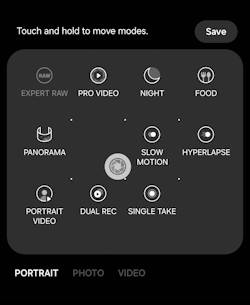
By default, the Galaxy S25 Camera app displays only three camera modes (of a total of 14) below the shutter button. However, you have the option to add additional camera modes and reorganize them according to your preferences, thereby facilitating quicker access to these modes when needed.

This Galaxy S25 camera guide explains and shows you step-by-step how to add more Galaxy S25 camera modes to the app interface and manage them to meet your needs.

This guide applies not only to Galaxy S25, S25+, S25 Ultra, and S25 Edge, but also to other Galaxy phones with the One UI 7 (Android 15) update, including Galaxy S24, S23, S22, and S21. Samsung unified the camera app in all Galaxy S phones with One UI 7.

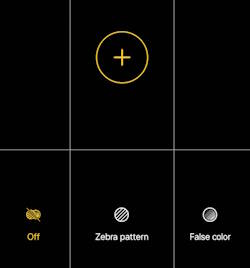
The One UI 8 (Android 16) update for Galaxy S25, S24, S23, and S22 added additional exposure control for the Pro mode and Pro video model.

To manage Galaxy S25 camera modes on Galaxy S25, you may follow these steps.

Step 1: Open the Camera app

You can open the Camera app on your Galaxy S25 in a few different ways, for example,

  • Tap the Camera app icon on the Home screen.
  • Tap the Camera app icon on the Apps screen.
  • Tap the camera widget on the Home screen
  • Press the Side key twice.
  • Swipe the Camera app shortcut on the Lock screen.

The camera widget also allows you to open the camera app with a pre-defined camera mode.

The camera app shortcut on the lock screen lets you open the camera app without unlocking the phone. But you can only review photos taken in the current session, for security reasons.

Step 2: Access other Galaxy S25 camera modes

As explained in the Galaxy S25 Camera app interface (which is identical to that on Galaxy S24, S23, S22, and S21 after the One UI 7 update), there are only 3 camera modes shown on the camera app interface: Portrait, Photo, and Video.

You can tap the More button, as shown below, to access all Galaxy S25 Camera modes.

Galaxy S25 camera app interface

In the pop-up … Read the rest

Use Galaxy S25 Camera App
Galaxy S25 Camera Guide, Galaxy S25 How-to Guides

How to Use Galaxy S25 Camera App?

Use Galaxy S25 Camera App

The Galaxy S25 Camera app is essential for unlocking the device's outstanding photographic potential. Mastering the Galaxy S25 Camera app is crucial for capturing high-quality photos and videos.

This Galaxy S25 Camera app guide explains the 5 sections of the Galaxy S25 Camera app user interface and their functions. It covers how to use the shutter button in the Camera app, how to switch between the front and rear cameras on the Galaxy S25, and how to manage the various camera modes in the Galaxy S25 Camera app. Additionally, the guide provides a detailed explanation of the meanings and usage of all the settings found in the Galaxy S25 Camera app user interface.

Although Galaxy S25, S25+, and S25 Ultra differ in camera capabilities, the Camera app on these 3 phones is identical. So, this guide applies to all Galaxy S25 phones. Some features that are exclusive to the Galaxy S25 Ultra are highlighted explicitly.

Understand the Galaxy S25 Camera app user interface

The Galaxy S25 Camera App user interface can be divided into 5 sections, as shown in the screenshot below:

  1. Preview screen section.
  2. Zoom and the quick tools section
  3. Functional buttons section.
  4. Camera mode selection section
  5. Current options section.
5 sections of Galaxy S25 Camera app interface

1. Preview screen section

In the Galaxy S25 Camera app, the preview screen section has three functions:

  • Preview the photo or video to be captured. This allows you to preview the scene before capturing it.
  • Enhance your photo-taking experience with exposure adjustment and lock, focus lock, pinch-to-zoom, and swipe-to-switch between front and rear
Read the rest
Meaning of Galaxy S25 Status Icons and Notification Icons
Galaxy S25 How-to Guides

Meaning of Galaxy S25 Status Icons and Notification Icons

Meaning of Galaxy S25 Status Icons and Notification Icons

Galaxy S25 status icons and notification icons on the Galaxy S25 series provide essential information regarding the device's battery level, connectivity status, signal strength, and notifications from designated applications. Understanding the meaning of these Galaxy S25 icons is crucial for optimizing the use of the Galaxy S25, Galaxy S25+, Galaxy S25 Ultra, and Galaxy S25 Edge. Galaxy S25 status icons and notification icons can help you fully leverage the capabilities of the latest hardware and new features available in these devices.

This Galaxy S25 how-to guide explains the meaning of Galaxy S25 status icons and notification icons shown on Galaxy S25, Galaxy S25+, Galaxy S25 Ultra, and Galaxy S25 Edge. The differences between Galaxy S25 status icons and notification icons are also highlighted. These Galaxy S25 icons are grouped into 8 categories to make it easier for you to locate them.

Please note that Samsung may employ region-specific and carrier-specific variations in some Galaxy S25 status icons and notification icons for the Galaxy S25. As a result, you might encounter discrepancies between the icons displayed in this guide and those present on your device. This is a common occurrence. If you find yourself needing clarification on certain icons, we encourage you to share a screenshot on our Facebook page, where the community can assist you in identifying and interpreting the icons accurately.

Update: The One UI 8 update forGalaxy S25, S25+, S25 Ultra, and S25 Edge does not introduce new status icons.

Read the rest
Layout of Galaxy S25, S25+, and S25 Ultra
Galaxy S25 How-to Guides

Layout of Galaxy S25, S25+, and S25 Ultra

Layout of Galaxy S25, S25+, and S25 Ultra

Gaining a deep understanding of the layout of Galaxy S25, Galaxy S25+, and Galaxy S25 Ultra is crucial for maximizing their value and effectiveness in everyday use. By familiarizing yourself with the design of Galaxy S25, S25+, and S25 Ultra, you can fully harness their capabilities and unlock the full potential of the flagship phone of 2025.

This Galaxy S25 How-to guide provides a comprehensive overview of the layout of Galaxy S25, S25+, and S25 Ultra. It details the functions of each component in the layout of Galaxy S25, S25+, and S25 Ultra, enabling you to gain a thorough understanding of these 3 models. Additionally, this guide offers you recommendations for the effective use and maintenance of each part depicted in the layout of Galaxy S25, S25+, and S25 Ultra, ensuring optimal performance and longevity of the Galaxy S25 series.

The Galaxy S25 and Galaxy S25+ vary in size, but their layouts are identical. In contrast, the Galaxy S25 Ultra features a different layout on the bottom and rear due to the inclusion of the S Pen and additional camera sensors, as explained in Galaxy S25 vs. Galaxy S25+ vs. Galaxy S25 Ultra. However, the front view of the Galaxy S25 Ultra is nearly identical to that of the Galaxy S25 and Galaxy S25+. The software, including the One UI 8 update (Android 16), is identical on all these models.

Front view of the layout of Galaxy S25, Galaxy S25+, and Galaxy S25 Ultra

The Galaxy S25 Ultra has made a noteworthy … Read the rest

Top 10 new features of Galaxy S25, S25+, and S25 Ultra
Galaxy S25 New Features, Galaxy S25 News and Updates, Galaxy S25 Reviews

Top 10 new features of Galaxy S25, S25+, and S25 Ultra

Top 10 new features of Galaxy S25, S25+, and S25 Ultra

The Galaxy S25 series may not represent the groundbreaking advancements that some stakeholders anticipated, which may lead to a sense of disappointment. Nevertheless, a range of compelling new features of Galaxy S25 reinforce its standing as the premier flagship smartphone of 2025.

This Galaxy S25 new features guide explains the top 10 new features of Galaxy S25, S25+, and S25 Ultra, including One UI 7, seamless action across apps, Personal Data Engine, Now Brief, Audio Eraser, Snapdragon 8 Elite for Galaxy, Nightography, Object-aware engine, Energy Score, and Virtual Aperture.

These top 10 new features of Galaxy S25 are available in all three models of Galaxy S25 (S25, S25+, and S25 Ultra), although the three models differ significantly. You may check this post on the new Galaxy AI features on Galaxy S25, S25+, and S25 Ultra.

If you have updated your Galaxy S25 to One UI 8 (Android 16), there are some must-try new features.

1. One UI 7

The Galaxy S25, S25+, and S25 Ultra come pre-installed with Android 15. However, it is One UI 7 that truly sets the Galaxy S25 series apart from others. One UI 7 features more refined and easier-to-locate app icons, improved notification management, and a revamped lock screen that provides a quick overview of ongoing activities. Additionally, compared to One UI 6.1, Galaxy AI is tightly integrated into One UI 7 to enhance the user experience and future expansion of AI features.

The all-new Now Bar allows you to access your Now Brief, alerts, music, timer, and other useful information directly. The Now Bar is located at the bottom of the lock screen on the Galaxy S25. When an alert from Now Brief comes in, it slides up behind a stack of notifications from active apps on the Now Bar.

Customizable widgets enable you to manage and personalize the layout of widgets on the Home screen. Certain widgets, such as the weather, clock, sleep score, and gallery, can slide into view from both the left and right sides.

Live notifications display … Read the rest

Samsung Galaxy S25 vs. S25+ vs. S25 Ultra: What Are the Differences?
Galaxy AI, Galaxy S25 How-to Guides, Galaxy S25 News and Updates

Samsung Galaxy S25 vs. S25+ vs. S25 Ultra: What Are the Differences?

Samsung Galaxy S25 vs. S25+ vs. S25 Ultra: What Are the Differences?

Samsung's Galaxy S25 series is a lineup of three flagship smartphones that offer a variety of features and price points. The Galaxy S25 is the most affordable model, while the Galaxy S25 Ultra is the most expensive and feature-packed. The Galaxy S25+ sits in the middle, offering a balance of features and price.

In this overview of the Galaxy S25 series, we delve into the key differences and similarities among the Galaxy S25 vs. S25+ vs. S25 Ultra models. By highlighting 10 distinct differences and 9 notable similarities, this Galaxy S25 News and Updates post aims to provide you with the essential insights needed to make an informed decision regarding your interest in the Galaxy S25.

First, let's start with the similarities.

Key Similarities among Galaxy S25 vs. S25+ vs. S25 Ultra

Although Galaxy S25, S25+, and S25 Ultra differ noticeably in size, they share common key features

All three models of Galaxy S25 share several key features, including:

  • Galaxy AI Features. All three models share the same core AI capabilities, mainly powered by Gemini. The new Galaxy AI features include voice-activated searches, Audio Eraser, Auto Trim, Now Brief (daily information updates), and Seamless action across apps. The Galaxy AI features introduced in One UI 6.1 and One UI 6.1.1, of course, are available on Galaxy S25.
  • Updated ProVisual Engine and Photo Assist. Samsung Galaxy S25 comes with the updated ProVisual Engine and Photo Assist, which include a set of AI-powered image processing, photo taking, and photo editing tools. You can use them on all three models.
  • Nightography Video. Low-light video recording is enhanced on all models.
  • Audio Eraser. Background noise reduction in videos is available across the series.
  • Processor and RAM. All models use the Qualcomm Snapdragon 8 Elite for Galaxy processor. In most regions, the RAM of all three models is identical (12GB).
  • Front Camera. Galaxy S25, S25+, and S25 Ultra share the same 12MP front camera (see layout of Galaxy S25, S25+, and S25 Ultra).
  • One UI 7 (Android 15). All models run the same Android software. Update: One UI 8 update (with Android 16
Read the rest
Galaxy S25 highlights
Galaxy S25 News and Updates

Official Highlights of Galaxy Unpacked January 2025: Galaxy S25

Galaxy S25 highlights

You can now enjoy the official highlights from the Galaxy Unpacked event, showcasing the latest Galaxy S25 lineup, which includes the Galaxy S25, S25+, and S25 Ultra. The 3-minute highlight reel captures the key features.

You may check this post to learn about the comparison of Galaxy S25 vs. Galaxy S25+ vs. Galaxy S25 Ultra. You may also check our top 10 new features of Galaxy S25, S25+, and S25 Ultra.

Here are the highlights of the video:

Samsung Galaxy S25 Ultra, 256GB Smartphone, Unlocked Android, AI Night Mode Camera, Snapdragon 8 Elite Fast Processor, 5000mAh Battery, Built-in S Pen, 2025, US 1 Yr Warranty, Titanium Black
Samsung Galaxy S25 Cell Phone, 128GB Smartphone, Unlocked Android, AI Night Mode Camera, Snapdragon 8 Elite Fast Processor, ProScaler Display, 4000mAh Battery, 2025, US 1 Yr Warranty, Icyblue
Samsung Galaxy S25+ Cell Phone, 256GB Smartphone, Unlocked Android, AI Night Mode Camera, Snapdragon 8 Elite Fast Processor, ProScaler Display, 4900mAh Battery, 2025, US 1 Yr Warranty, Silver Shadow
Samsung Galaxy S25 Ultra, 256GB Smartphone, Unlocked Android, AI Night Mode Camera, Snapdragon 8 Elite Fast Processor, 5000mAh Battery, Built-in S Pen, 2025, US 1 Yr Warranty, Titanium Black
Samsung Galaxy S25 Cell Phone, 128GB Smartphone, Unlocked Android, AI Night Mode Camera, Snapdragon 8 Elite Fast Processor, ProScaler Display, 4000mAh Battery, 2025, US 1 Yr Warranty, Icyblue
Samsung Galaxy S25+ Cell Phone, 256GB Smartphone, Unlocked Android, AI Night Mode Camera, Snapdragon 8 Elite Fast Processor, ProScaler Display, 4900mAh Battery, 2025, US 1 Yr Warranty, Silver Shadow
-
-
-
Samsung Galaxy S25 Ultra, 256GB Smartphone, Unlocked Android, AI Night Mode Camera, Snapdragon 8 Elite Fast Processor, 5000mAh Battery, Built-in S Pen, 2025, US 1 Yr Warranty, Titanium Black
-
Samsung Galaxy S25 Cell Phone, 128GB Smartphone, Unlocked Android, AI Night Mode Camera, Snapdragon 8 Elite Fast Processor, ProScaler Display, 4000mAh Battery, 2025, US 1 Yr Warranty, Icyblue
-
Samsung Galaxy S25+ Cell Phone, 256GB Smartphone, Unlocked Android, AI Night Mode Camera, Snapdragon 8 Elite Fast Processor, ProScaler Display, 4900mAh Battery, 2025, US 1 Yr Warranty, Silver Shadow
-
  1. 00:00 Intro.
  2. 00:17 Galaxy S25 Series in one sentence. Galaxy S25 understands what you need and what you will need next.
  3. 00:24: Galaxy AI. Now Brief, Personal Data Engine, AI Agents, Gemini integration, and Gemini Live are highlighted by Samsung. You can check all of the new Galaxy AI features here.
  4. 01:24: Hardware. The highlighted Galaxy S25 hardware upgrades are the Snapdragon 8 Elite Mobile Platform for Galaxy, 40% expanded vapor chamber, long battery life (up to 31 hours of video play), and Corning Gorilla Armor 2 (Galaxy S25 Ultra only).
  5. 01:54: Camera. Samsung highlighted the upgraded ProVisual Engine, improved Nightography, and the
Read the rest
Scroll to Top