

The Galaxy S25 Flipsuit case allows you to insert a customizable card into the case, which automatically synchronizes the lock screen and Always On Display with the card's design.
The Flipsuit Case for Galaxy S25 is available for Galaxy S25, Galaxy S25+, and Galaxy S25 Ultra. The sole distinction among these models lies in the fitting. Consequently, this guide is relevant for all variants of the Flipsuit Cases.
This Galaxy S25 accessories guide elucidates the origin and functionality of the Galaxy S25 Flipsuit Case, highlighting its distinctive features, as well as the procedures for attachment and usage. Additionally, a comprehensive review of the Galaxy S25 Flipsuit Case is presented, accompanied by answers to frequently asked questions regarding this accessory.
Update: One UI 8 (Android 16) update does not change the behavior of the Galaxy S25 Flipsuit case.
- The History of the Flipsuit Case
- Components of Galaxy S25 Flipsuit Case and Their Functions
- Unique features of the Galaxy S25 Flipsuit Case
- How to Attach the Galaxy S25 Flipsuit Case to Galaxy S25?
- How to Activate and Deactivate the Galaxy S25 Flipsuit Case on Galaxy S25?
- A concise review of Galaxy S25 Flipsuit Case
- FAQs about the Galaxy S25 Flipsuit Case
- Q1: After I attached the case to Galaxy S25, the lock screen wallpaper did not change. Why?
- Q2: Can I use the matching wallpaper for the Home screen?
- Q3. Can I use the matching wallpaper if I lose the interactive card?
- Q4: Can I use the interactive card with other cases/covers?
- Q5. Does the Galaxy S25 Flipsuit Case affect wireless charging or wireless power sharing?
- Q6: Does the Galaxy S25 Flipsuit Case affect battery life?
- Q7: Does the Galaxy S25 Flipsuit Case affect contactless payment (e.g., Samsung Pay)?
- Do you have any questions about the Galaxy S25 Flipsuit Case?
The History of the Flipsuit Case
Samsung introduced its first Flipsuit case for the Galaxy Z Flip 5 in 2023. With the case, you can match the cover screen (external display) of the Galaxy Z Flip 5 with the replaceable card (interactive card) in the case.
In 2024, the Flipsuit case was extended to the Galaxy S family (Galaxy S24). The wallpaper on the lock screen and Always-on Display match the card in the case.
The Galaxy S25 Flipsuit case is the third iteration of this unique accessory. Samsung improved the material and added the “rugged” version.
Please note the Flipsuit case is a back cover only. Samsung stopped the flip cover accessories (e.g., S View flip cover) for the Galaxy S25.
Components of Galaxy S25 Flipsuit Case and Their Functions
The Galaxy S25 Flipsuit Case comprises two parts:
- The frame case.
- The interactive card.
The frame case, just like other smartphone frame cases, wraps around the frame of the phone to provide protection for the frame. The elevated design of the frame may provide supplementary protection for both the screen and the rear panel of the Galaxy S25
The magic comes from the interactive card, which is NFC-enabled. There is no Galaxy AI involved. In the Galaxy 25 Flipsuit Case box, Samsung now offers two cards: one with the artwork, like that in the Galaxy S24 Flipsuit Case. The other is translucent without any artwork.
The interactive card has two functions:
- Automatically activate the wallpaper matching the artwork of the card.
- Convert the frame case to a back cover.
Upon the detection of the interactive card, Galaxy S25 will initiate the download and installation of the associated artwork (as animation/video). This artwork will subsequently be activated as the wallpaper for the lock screen (and AOD screen) of the Galaxy S25. You have the option to disable this wallpaper if you choose to do so.
In a nutshell, the interactive card simply sets the lock screen wallpaper to match the interactive card detected. Once you remove the card, the wallpaper becomes unavailable, which is frustrating. This is likely due to copyright issues.
Although the interactive card can work with other frame cases, if your Galaxy S25 case can hold the interactive card, it is NOT recommended to use the interactive card in this way. The thickness of the card may reduce the protection level for the phone provided by the case. So, it is better to use the bundled frame case.
Unique features of the Galaxy S25 Flipsuit Case
The unique features of the case are implemented through an NFC connection.
Compared to other Galaxy S25 cases and covers, the Galaxy S25 Flipsuit Case offers three unique features.
- An improved frame cover with a removable back panel.
- A matching lock screen, which is enabled automatically by an interactive card.
- Swappable interactive cards featuring different artworks.
An improved frame cover with a removable back panel
The Galaxy S25 Flipsuit Case features a well-designed frame cover that integrates with an interactive card, which also serves as its back panel. This novel design allows you to easily transform the case from a frame cover into a standard back cover, ensuring the phone remains safeguarded against everyday wear and tear.
The frame cover has also been improved greatly compared to the previous generation. The material looks more durable. And the raise (in both front and back) is increased a bit to offer better protection.
A matching lock screen enabled by an interactive card
As mentioned, the most innovative feature of the Galaxy S25 Flipsuit Case is the automatically set wallpaper on the lock screen. This lock screen wallpaper will match the interactive card you placed in the case.
You do not need to do anything. The phone will set it up automatically.
Also, the video wallpaper does not affect the Now Bar and Now Brief.
Swappable interactive cards featuring different artworks
You can swap the card to get a new matching lock screen wallpaper.
Each interactive card features the artwork of an artist. The lock screen wallpaper (animation) highlights some signature features of the artwork.
Now, Samsung also includes a blank (semi-transparent) card without any artwork in the Galaxy S25 Flipsuit case box. You can swap to this card if you want to use it as a normal back cover.
![SAMSUNG Galaxy Ring, AI Smart Ring, Size First w/Sizing Kit, No App Subscription, Fitness Monitor, Sleep Tracker, Up to 7-Day Battery, Size 10, Titanium Gold [US Version, 1Yr Manufacturer Warranty]](https://m.media-amazon.com/images/I/41R1PkmCQxL._SL160_.jpg)
![Samsung Galaxy Watch 7 40mm Bluetooth AI Smartwatch w/Energy Score, Wellness Tips, Heart Rate Tracking, Sleep Monitor, Fitness Tracker, 2024, Green [US Version, 1Yr Manufacturer Warranty]](https://m.media-amazon.com/images/I/41ew4GQ5kML._SL160_.jpg)

How to Attach the Galaxy S25 Flipsuit Case to Galaxy S25?
You can follow these steps to attach the Galaxy S25 Flipsuit case to your Galaxy S25 and then start to use the customized wallpaper.
Step 1: Remove the plastic cover from the interactive card
In contrast to previous generations of the Flipsuit cases, Samsung has now applied a plastic protective film over the printed surface of the interactive card. It is better to remove this protective film prior to affixing the case to the phone.
By default, in most regions, there are two interactive cards in the box: one with artwork print and the other without (blank).
As shown in the picture below, you can easily remove the protective film (transfer paper) from the interactive card.
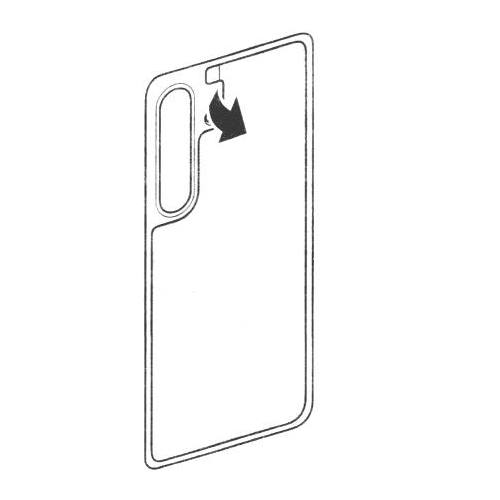
Step 2: Put the interactive card into the frame case
Upon removal of the protective film or transfer paper, the card may be subsequently placed into the frame case, as depicted in the illustration below.
The interactive card is designed to fit perfectly within the frame case. The rear section of the frame case is extended slightly to accommodate the card, allowing it to serve effectively as the back panel of the case.
It is important to ensure that the printed side of the card is oriented outward.
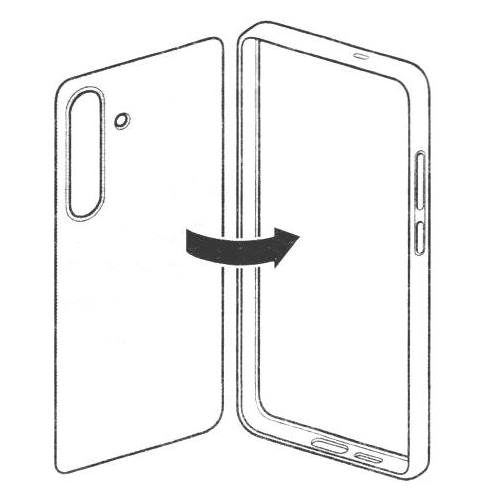
Step 3: Attach the case to Galaxy S25
Before attaching the case to your Galaxy S25, you need to make sure:
- The USB port is free. There should be no cable or other accessories attached.
- For the Galaxy S25 Ultra, the S Pen must be secured in the S Pen slot, as shown in the picture below.
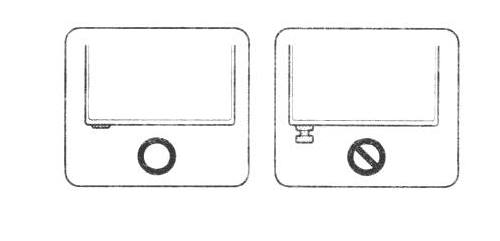
When attaching the Galaxy S25 Flipsuit Case to the phone, you should start from the right side (with volume and Side keys, see Galaxy S25 layout), as shown below, to avoid any damage to the buttons. It should be very easy to align the rear cameras with the cutout.
Although the frame case is made of hard plastics, it is flexible enough for you to bend it a bit to fit the phone in.
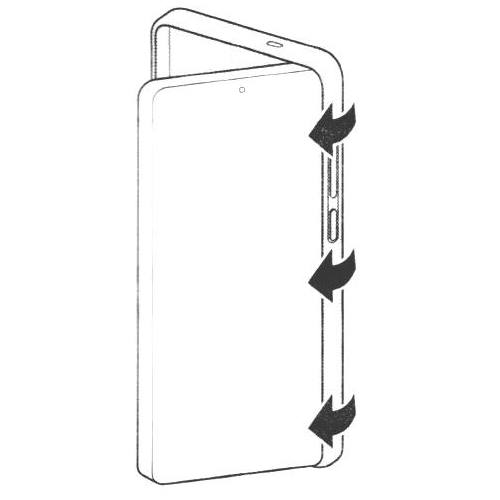
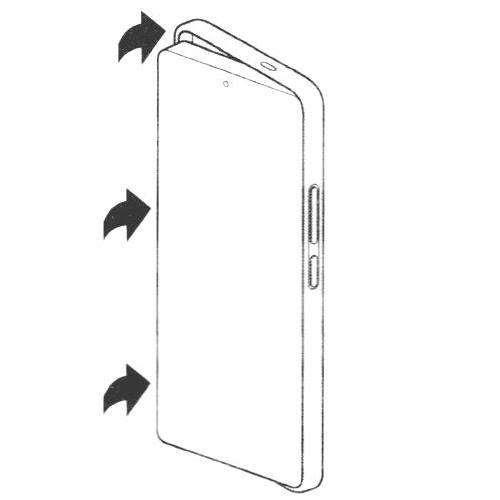
Once the right side is fully in the case, you can push the other sides of the phone into the case, as shown in the illustration above.
If you want to change the interactive card, you need to reverse these steps to swap the card.
How to Activate and Deactivate the Galaxy S25 Flipsuit Case on Galaxy S25?
The Galaxy S25 Flipsuit Case works automatically after you attach it to the phone.
Upon attaching the case to the device, the lock screen wallpaper will be updated within a few seconds to display a new video that corresponds with the interactive card.
The Galaxy S25 Flipsuit Case is designed to work out of the box without changing any settings. The corresponding lock screen wallpaper is automatically downloaded, installed, and activated without the need for additional user input.
However, you still have the ability to activate or deactivate the wallpaper of the Galaxy S25 Flipsuit Case.
There are at least two ways to deactivate the Galaxy S25 Flipsuit Case on your Galaxy S25 without removing the case:
- Disable Flipsuit Case in wallpaper settings.
- Choose any other wallpapers.
For example, as shown in the screenshot below, you can open Galaxy S25 Settings, and tap Wallpaper and style.
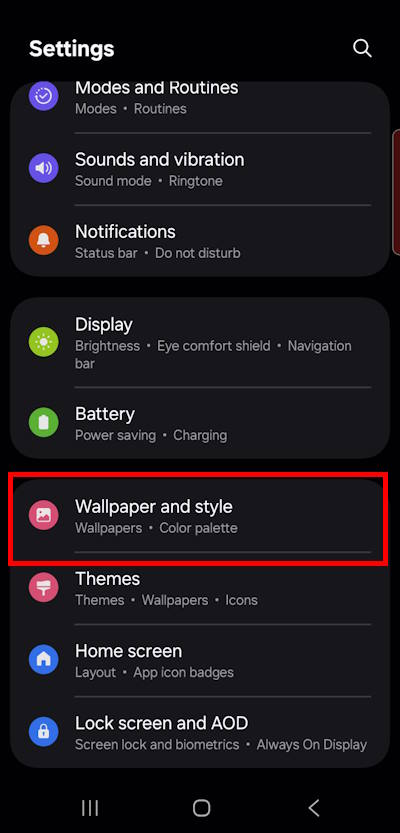

On the Wallpaper and Style page, as illustrated in the screenshot above, you will locate the entry for the Flipsuit Case. By tapping on this option, you can then deactivate the Flipsuit Case. Consequently, this action will disable the wallpaper associated with the interactive card, and the default lock screen wallpaper will be automatically applied within a few seconds.
Of course, after deactivating the Galaxy S25 Flipsuit Case, you can use this switch to activate whenever you want.
Another way to deactivate the flipsuit case is by directly changing the lock screen wallpaper. After choosing any other wallpapers, you effectively deactivate the wallpaper associated with the flipsuit case. Remember, you can tap and hold to customize the Galaxy S25 lock screen.
Please note that if you cannot find the Flipsuit Case entry after attaching the case to the phone, you very likely will not see the matching wallpaper. This means that the interactive card is not detected. You need to make sure NFC and contactless payments are enabled under Settings —Connections. You may also check the NFC icon in the status bar.
A concise review of Galaxy S25 Flipsuit Case
Advantages of Galaxy S25 Flipsuit Case
Compared to other Galaxy S25 cases, the Galaxy S25 Flipsuit Case has the following advantages:
- Add styles to Galaxy S25.
- Swappable interactive cards.
- Perfect fit.
- Durable.
- Lightweight.
- Improved design offers better protection for both the screen and the back panel.
Disadvantages of the Galaxy S25 Flipsuit Case
The case also suffers from the following issues:
- Expensive. Samsung asks for $49.99 for the frame case with one interactive card. Additional interactive cards will cost you $14.99 each.
- The material used for the frame case is a bit slippery in the hands.
- No protection for the camera lens on the back, like most other frame cases. After attaching the case, the camera lens still protrudes over the case. This is different from most back covers. The added interactive card offers some protection for the back panel of the phone only.
- No color options for the frame cover.
The Galaxy S25 Flipsuit Case presents an appealing option for individuals who wish to explore innovative designs and enhance the look of their Galaxy S25. It offers a level of protection that falls between that of a frame cover and a normal back cover. For those in need of a flip cover, the option is now limited to third-party accessories because Samsung does not offer any flip cover for the Galaxy S25.


FAQs about the Galaxy S25 Flipsuit Case
Q1: After I attached the case to Galaxy S25, the lock screen wallpaper did not change. Why?
A1: Very likely, the NFC on the phone failed to detect the interactive card.
You can try to attach the case again. You may also try to check Settings — Connections and make sure NFC is not turned off.
Besides, an active Internet connection is needed to download the animation (video) when you use the interactive card for the first time.
Q2: Can I use the matching wallpaper for the Home screen?
No, the matching wallpaper of the Galaxy S25 Flipsuit Case is for the lock screen only. Currently, there is no way to apply it to both the Home screen and Lock screen.
Q3. Can I use the matching wallpaper if I lose the interactive card?
No, you cannot use the matching wallpaper if the interactive card is not detected.
The interactive card is required to activate the wallpaper at all times.
As the wallpaper and artwork on the interactive card are licensed from a third party, you do not “own” a copy of the wallpaper. You only own the card.
Hopefully, Samsung can negotiate a better term to make the wallpaper (video) “purchased” content so that users can use it even if the interactive card is not detected.
Q4: Can I use the interactive card with other cases/covers?
Yes, you can use the interactive card with any cases or covers if you can fit the card in the back of the Galaxy S25.
The frame case included in the Galaxy S25 Flipsuit Case has no special features except for the slightly extended back to hold the card.
If your frame cover, back cover, or even flip cover can hold the card to the back of the phone, all Galaxy S25 Flipsuit Cover features should work.
However, you need to note:
- The interactive card must be detectable (by NFC) at all times.
- The added card may significantly decrease the protection provided by the case/cover.
Q5. Does the Galaxy S25 Flipsuit Case affect wireless charging or wireless power sharing?
No, wireless charging and reverse wireless charging (i.e., wireless power sharing) are NOT affected.
However, Samsung did state that:
When the product is attached to your device, the Wireless power sharing feature and wireless charging may not work properly. It is recommended to remove the product before using these features.
Based on our experiments, both wireless charging and wireless power share work properly without removing the Galaxy S25 Flipsuit Case.
Q6: Does the Galaxy S25 Flipsuit Case affect battery life?
Normally, the Galaxy S25 Flipsuit Case does not drain the battery noticeably because the connection is purely through NFC. The power consumption for the case itself is negligible.
Using the video (animation) wallpaper may consume slightly more battery than using a picture. But overall, the battery drain is still negligible.
In short, it is unnecessary to worry about battery life when using the Galaxy S25 Flipsuit Case. You may also turn on Battery Protection and battery saver (light performance profile) if you want.
Q7: Does the Galaxy S25 Flipsuit Case affect contactless payment (e.g., Samsung Pay)?
No, contactless payment through NFC is not affected by the case. It is not necessary to remove the case when making such payments.
Do you have any questions about the Galaxy S25 Flipsuit Case?
Please let us know in the comment box if you need help with the Galaxy S25 Flipsuit Case.
The community will help you.
You may check other sections of Galaxy S25 Guides: Everything about Galaxy S25:

- The Galaxy S25 News and Updates section provides the latest news, updates, and analyses for Samsung Galaxy S25, S25+, S25 Ultra, and S25 Slim. You can find a broad range of topics, including Galaxy S25 specifications, design features, One UI updates, and market dynamics so that Galaxy S25 owners or potential owners can remain well-informed about the latest updates and trends of Galaxy S25.
- The Galaxy S25 New Features Guides deliver an in-depth analysis of the advancements and new capabilities of the Galaxy S25, S25+, and S25 Ultra models compared to their predecessors in the Galaxy S series, as well as other leading Android flagship devices. These guides are an invaluable resource for answering technical questions related to Galaxy S25, while also offering detailed insights and comparative evaluations to facilitate informed decision-making in the purchasing process.
- The Galaxy AI Guides section comprises a thorough collection of resources and tools aimed at assisting users in effectively navigating and using the features of Galaxy AI on Galaxy S25, S25+, and SD25 Ultra. This section includes detailed explanations, comprehensive step-by-step instructions, and expert recommendations. Each guide is specifically designed to address particular functionalities, ensuring that individuals, regardless of their experience level, can enhance their knowledge and efficiency in utilizing Galaxy AI.
- The Galaxy S25 How-to Guides provide an extensive array of resources that deliver comprehensive instructions on using and personalizing the Galaxy S25, S25+, and S25 Ultra. These thorough guides encompass all facets of operating the Galaxy S25 series, including hardware and software features, functionalities of the Android operating system and One UI, as well as procedures for migration and data sharing. By consulting the Galaxy S25 How-to Guides, you can gain an in-depth understanding of both the capabilities and customization options available for your Galaxy S25, S25+, and S25 Ultra.
- The Galaxy S25 Camera Guides section offers a comprehensive compilation of instructional resources designed to assist Galaxy S25 owners in effectively using the Galaxy S25 camera for capturing exceptional photographs and recording high-quality videos. Additionally, it includes guidance on the application of the photo (and video) editor available on the Galaxy S25, S25+, and S25 Ultra.
- The Galaxy S25 Accessories Guides section offers detailed guides on the usage of various accessories specifically designed to enhance functionality and protect the Galaxy S25, S25+, and S25 Ultra. These guides cover a wide range of topics, including protective accessories and feature augmentation accessories. Furthermore, this section provides comprehensive reviews of specific accessories for Galaxy S25, S25+, and S25 Ultra.
- The Galaxy S25 User Manual section comprises the official user manual for the Samsung Galaxy S25, S25+, and S25 Ultra, available in PDF format. These user manuals have been released by Samsung across various regions and are organized according to the respective languages. The content of this material is comprehensive and structured, facilitating easier access to the necessary information for Galaxy S25 owners.
- The Galaxy S25 Reviews section is dedicated to reviews of the Galaxy S25, S25+, and S25 Ultra and their accessories. These reviews are all based on our own usage as consumers. Depending on the objects being reviewed, Galaxy S25 reviews include detailed technology and design evaluations, everyday usage and performance, and comparison to other similar products.
You can also reach us through:
- Our Facebook page.
- Our YouTube channel.
- Contact Us page.
Don't miss out on the latest updates, guides, tips, and tricks for the Samsung Galaxy S25 – sign up for our newsletter now!