AOD

Use the Light Performance Profile to Extend Battery Life and Reduce Heat on Galaxy S24, S23, S22, and S21 (all Samsung Galaxy Phones with Android 14/One UI 6.0)
Galaxy S24 light performance profile
Use the Light Performance Profile to Extend Battery Life and Reduce Heat on Galaxy S24, S23, S22, and S21 (all Samsung Galaxy Phones with Android 14/One UI 6.0)

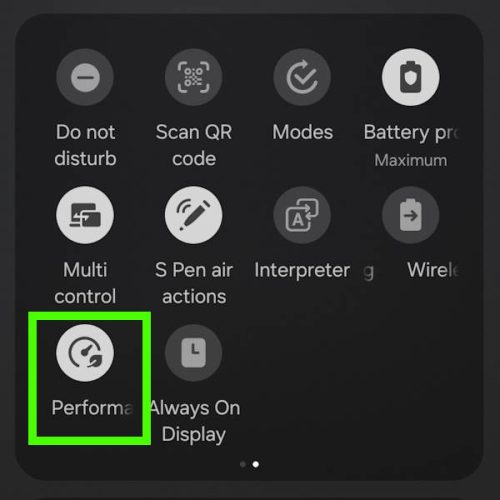
Galaxy S24 comes with the performance profile (aka performance mode) option. You can switch to the light performance profile (aka light performance mode or light mode) to extend battery life and reduce the heat generated without affecting the usage or speed for almost all tasks.

This Galaxy S24 how-to guide explains the two performance profiles of Galaxy S24, namely, the standard performance profile and the light performance profile. We will also show you when and how to enable and disable them. The differences between the light performance profile, battery protection, power saving mode, and data saver will also be discussed. Some additional battery-saving tips are also provided.

Performance profiles were actually first introduced in the Android 14 (One UI 6)update for Galaxy S23, S22, S21, and other Galaxy phones. So, you can use the light performance profile (light performance mode) on all Samsung Galaxy devices with Android 14, e.g., Galaxy S24, S23, S22, and S21.
Read the rest

Use the Light Performance Profile to Extend Battery Life and Reduce Heat on Galaxy S24, S23, S22, and S21 (all Samsung Galaxy Phones with Android 14/One UI 6.0) Read More »

Galaxy S24 How-to Guides, Galaxy S24 New Fearures Guides, , , , , , , , , , , , , , , , , , , , , , , , , ,

How to adjust lock screen timeout on Galaxy S24, S23, S22, and other Galaxy devices?

adjust lock screen timeout on Galaxy S24, S23, S22, and other Galaxy phones

There is no lock screen timeout entry in the Settings of all Android phones (including the Galaxy S24 and other Galaxy phones). You may wonder whether and how you can adjust (usually extend) the lock screen timeout on the Galaxy S24 and other Android devices.

This Galaxy S24 how-to guide explains why you cannot control the lock screen timeout on the Galaxy S24 with the screen (display) timeout setting and then shows you two methods you can use to extend the lock screen timeout up to 10 minutes on the Galaxy S24 and other Galaxy devices.

The accessibility timeout (Time to take action) method discussed in this guide applies to all Android phones with Android 10 or newer. The Good Lock method is for Galaxy S24 and other Galaxy devices (with Android Pie or later) only.

Read the rest

How to adjust lock screen timeout on Galaxy S24, S23, S22, and other Galaxy devices? Read More »

Galaxy S24 How-to Guides, , , , , , , , , , , , , , , , , , , , , ,

Samsung Galaxy S24 Smart View Wallet Case: A Definite Guide

Samsung Galaxy S24 Smart View Wallet Case: A Definite Guide

The Samsung Galaxy S24 Smart View Wallet Case, also known as the Galaxy S24 S View Wallet Case or Galaxy S24 Clear View Case, is a unique flip case for Galaxy S24. It has gained popularity among Galaxy phone users since Galaxy S4.

This Galaxy S24 accessories guide explains the unique features of the Galaxy S24 Smart View (S View) Wallet case, how to attach, remove, and customize the Galaxy S24 Smart View (S View) Wallet case, and how to use the S View window on Galaxy S24. Also, you can find a concise review of the Samsung Galaxy S24 Smart View (S View) Wallet Case, along with answers to some of the most common questions about this case.

Please note that the Smart View (S View) Cover for Galaxy S24, S24+, and S24 Ultra have different sizes to match the size and layout of the corresponding phones. This means that they cannot be used interchangeably. However, their features and functions are the same. When we use the term “Galaxy S24” in this guide, we are referring to all three of these models.

Read the rest

Samsung Galaxy S24 Smart View Wallet Case: A Definite Guide Read More »

Galaxy S24 Accessories Guides, Galaxy S24 How-to Guides, , , , , , , , , , , , , , , , , , , , , , , , , , , ,
Scroll to Top