battery

Use the Light Performance Profile to Extend Battery Life and Reduce Heat on Galaxy S24, S23, S22, and S21 (all Samsung Galaxy Phones with Android 14/One UI 6.0)

Galaxy S24 light performance profile
Use the Light Performance Profile to Extend Battery Life and Reduce Heat on Galaxy S24, S23, S22, and S21 (all Samsung Galaxy Phones with Android 14/One UI 6.0)

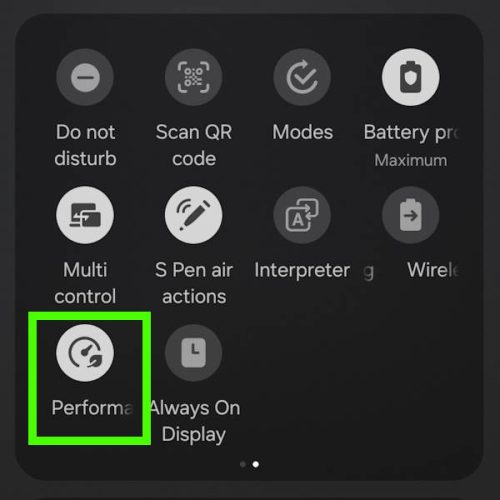
Galaxy S24 comes with the performance profile (aka performance mode) option. You can switch to the light performance profile (aka light performance mode or light mode) to extend battery life and reduce the heat generated without affecting the usage or speed for almost all tasks.

This Galaxy S24 how-to guide explains the two performance profiles of Galaxy S24, namely, the standard performance profile and the light performance profile. We will also show you when and how to enable and disable them. The differences between the light performance profile, battery protection, power saving mode, and data saver will also be discussed. Some additional battery-saving tips are also provided.

Performance profiles were actually first introduced in the Android 14 (One UI 6)update for Galaxy S23, S22, S21, and other Galaxy phones. So, you can use the light performance profile (light performance mode) on all Samsung Galaxy devices with Android 14, e.g., Galaxy S24, S23, S22, and S21.
Read the rest

Use the Light Performance Profile to Extend Battery Life and Reduce Heat on Galaxy S24, S23, S22, and S21 (all Samsung Galaxy Phones with Android 14/One UI 6.0) Read More »

Galaxy S24 How-to Guides, Galaxy S24 New Fearures Guides, , , , , , , , , , , , , , , , , , , , , , , , , ,

Meaning of Galaxy S24 status icons and notification icons on Galaxy S24, S24+, and S24 Ultra

meaning of  Galaxy S24 status icons and notification icons shown on Galaxy S24, Galaxy S24+, and Galaxy S24 Ultra

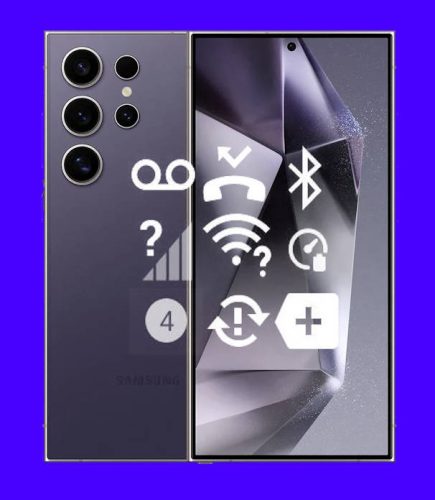
Galaxy S24 status icons and notification icons provide critical information regarding the phone's battery level, connectivity status, signal strength, and notifications from specific applications. It is essential to comprehend the meaning of these icons to optimize the usage of Galaxy S24, Galaxy S24+, or Galaxy S24 Ultra and get the most from the updated hardware and new features.

This Galaxy S24 how-to guide explains the meaning of Galaxy S24 status icons and notification icons shown on Galaxy S24, Galaxy S24+, and Galaxy S24 Ultra. The differences between Galaxy S24 status icons and notification icons are also explained. These icons are grouped into 8 categories to make it easier for you to locate them.

Just so you know, Samsung uses slightly different icons in some regions or for different carriers, which may result in a few Galaxy S24 status icons and notification icons appearing different from those shown in this guide. This is an expected occurrence. If you have trouble understanding the meaning of those icons, we recommend you share a screenshot of them on our Facebook page. The community will help you identify and understand the icons in question.

Read the rest

Meaning of Galaxy S24 status icons and notification icons on Galaxy S24, S24+, and S24 Ultra Read More »

Galaxy S24 How-to Guides, , , , , , , , , , , , , , , , , , , , , , , , , , , , , , , , , , , , , , , , , , , , , , , , , , , , , , , , , ,
Scroll to Top