Seamless action across apps

New Galaxy AI features in Galaxy S25, S25+, and S25 Ultra
Galaxy AI, Galaxy S25 New Features, Galaxy S25 News and Updates

New Galaxy AI features in Galaxy S25, S25+, and S25 Ultra

New Galaxy AI features in Galaxy S25, S25+, and S25 Ultra

Samsung updated Galaxy AI with the release of Galaxy S25. Some new Galaxy AI features were added and some existing Galaxy AI features were udpated.

This Galaxy AI guide explains the new Galaxy AI features in Galaxy S25, including Now Brief, Cross app action, Audio Eraser, Auto Trim, Personal Data Engine, ProScaler, Multimodal AI agents, AI Select, Writing Assist, and Drawing Assist.

Galaxy AI features introduced in One UI 6.1 and One UI 6.1.1 were explained on this page.

All these 10 new Galaxy AI features, except ProScaler, are available on all three models of Galaxy S25, S25+, and S25 Ultra.

Update: One UI 8 update introduced some new Galaxy AI features and improvements, as explained in this post.

 1. Now Brief

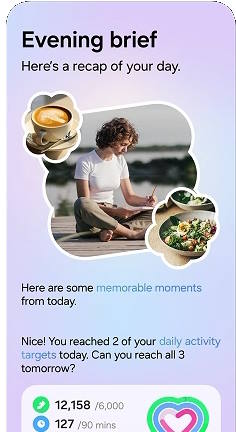
One of the most practical new features of the Galaxy S25 is called Now Brief. This AI-driven tool offers users personalized summaries tailored to their preferences. You choose (enroll) apps and content to be included for Now Brief. For instance, in the morning, users can check their daily schedules and receive energy scores from their Samsung wearables.

Now Brief is readily accessible on the Galaxy S25 lock screen through the Now Bar located at the bottom. You can also add a shortcut or widget for Now Brief on the Home screen of the Galaxy S25. Additionally, you can access Now Brief from the Edge panel at any time.

You will receive three briefings each day by default: one in the morning, one at midday, and one in the evening.

2. Cross App Action

The Cross App Action is actually powered by Gemini, which is integrated with Samsung's Galaxy AI to access Galaxy native apps (pre-installed apps). Samsung marked this feature as Seamless action across apps. You can access it in various ways, e.g., by pressing and holding the Side key.

The Cross App Action feature works with Google Apps, Galaxy Native Apps, and a select few third-party apps like WhatsApp and Spotify. You can ask Gemini to perform multiple tasks in a single command, either by typing prompts or using your voice. The most powerful aspect … Read the rest

Top 10 new features of Galaxy S25, S25+, and S25 Ultra
Galaxy S25 New Features, Galaxy S25 News and Updates, Galaxy S25 Reviews

Top 10 new features of Galaxy S25, S25+, and S25 Ultra

Top 10 new features of Galaxy S25, S25+, and S25 Ultra

The Galaxy S25 series may not represent the groundbreaking advancements that some stakeholders anticipated, which may lead to a sense of disappointment. Nevertheless, a range of compelling new features of Galaxy S25 reinforce its standing as the premier flagship smartphone of 2025.

This Galaxy S25 new features guide explains the top 10 new features of Galaxy S25, S25+, and S25 Ultra, including One UI 7, seamless action across apps, Personal Data Engine, Now Brief, Audio Eraser, Snapdragon 8 Elite for Galaxy, Nightography, Object-aware engine, Energy Score, and Virtual Aperture.

These top 10 new features of Galaxy S25 are available in all three models of Galaxy S25 (S25, S25+, and S25 Ultra), although the three models differ significantly. You may check this post on the new Galaxy AI features on Galaxy S25, S25+, and S25 Ultra.

If you have updated your Galaxy S25 to One UI 8 (Android 16), there are some must-try new features.

1. One UI 7

The Galaxy S25, S25+, and S25 Ultra come pre-installed with Android 15. However, it is One UI 7 that truly sets the Galaxy S25 series apart from others. One UI 7 features more refined and easier-to-locate app icons, improved notification management, and a revamped lock screen that provides a quick overview of ongoing activities. Additionally, compared to One UI 6.1, Galaxy AI is tightly integrated into One UI 7 to enhance the user experience and future expansion of AI features.

The all-new Now Bar allows you to access your Now Brief, alerts, music, timer, and other useful information directly. The Now Bar is located at the bottom of the lock screen on the Galaxy S25. When an alert from Now Brief comes in, it slides up behind a stack of notifications from active apps on the Now Bar.

Customizable widgets enable you to manage and personalize the layout of widgets on the Home screen. Certain widgets, such as the weather, clock, sleep score, and gallery, can slide into view from both the left and right sides.

Live notifications display … Read the rest

Scroll to Top